
 关于使用Netty业务处理器ChannelHanlder的一些注意事项
# 前言
上一篇文章来聊聊Netty使用不当导致的并发波动问题 (opens new window)我们了解使用Netty时跨线程使用不当导致性能问题,这一篇我们不妨在并发方面展开论述,来聊聊Netty业务处理的并发问题。
# Netty并发安全问题
# 多连接使用不同的业务处理器
第一个场景我们会有多个客户端发起连接,每个客户端连接都有独立的业务处理,eventLoop收到这些任务之后向服务端发起连接。 紧接着服务端收到这一个个连接,就会将全局共享变量+1。
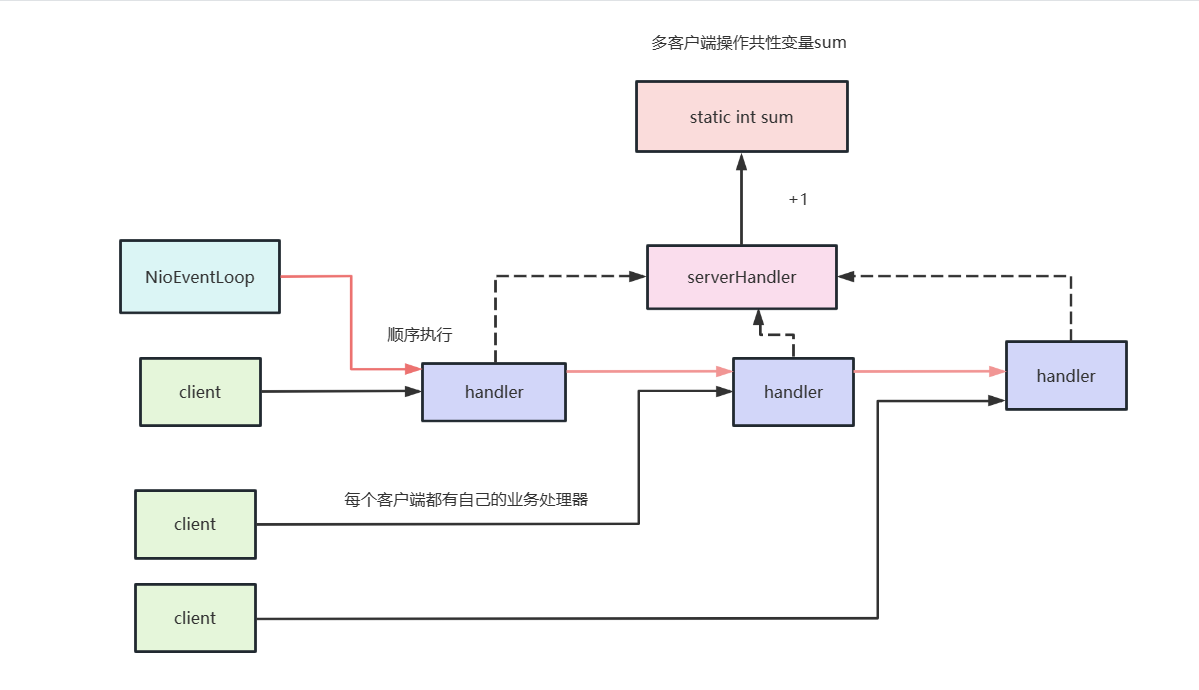
先来看看服务端代码,一套标准的模板,监听9999端口,使用ThreadSecurityServerHandler作为业务处理器。
public class ThreadSecurityServer {
    public static void main(String[] args) throws Exception {
        EventLoopGroup bossGroup = new NioEventLoopGroup(1);
        EventLoopGroup workerGroup = new NioEventLoopGroup();

        ServerBootstrap b = new ServerBootstrap();


        b.group(bossGroup, workerGroup)
                .channel(NioServerSocketChannel.class)
                .option(ChannelOption.SO_BACKLOG, 100)
                .childHandler(new ChannelInitializer<SocketChannel>() {
                    @Override
                    public void initChannel(SocketChannel ch) throws Exception {
                        ChannelPipeline p = ch.pipeline();
                        //业务处理器
                        p.addLast(new ThreadSecurityServerHandler());
                    }
                });

        //监听9999端口
        ChannelFuture f = b.bind(9999).sync();
        f.channel().closeFuture().sync();


        f.channel().closeFuture().addListener((future) -> {
            bossGroup.shutdownGracefully();
            workerGroup.shutdownGracefully();

        });
    }
2
3
4
5
6
7
8
9
10
11
12
13
14
15
16
17
18
19
20
21
22
23
24
25
26
27
28
29
30
31
32
而业务处理器代码也很简单,收到客户端的请求后就把sum+1。
public class ThreadSecurityServerHandler extends ChannelInboundHandlerAdapter {

    private static int sum1 = 0;


    //每次收到客户端的请求就+1
    public void channelRead(ChannelHandlerContext ctx, Object msg) {
        sum1 = sum1 + 1;
        System.out.println("Server receive client message :" + sum1);
    }

    @Override
    public void channelReadComplete(ChannelHandlerContext ctx) {
        ctx.flush();
    }

    @Override
    public void exceptionCaught(ChannelHandlerContext ctx, Throwable cause) {
        cause.printStackTrace();
        ctx.close();
    }
}
2
3
4
5
6
7
8
9
10
11
12
13
14
15
16
17
18
19
20
21
22
23
24
完成服务端编码后,我们继续完成客户端的编码,代码如下我们完成模板创建之后,连续进行100次异步连接,这就意味服务端就对sum进行100次自增。
public class NoThreadSecurityClient {


	public void connect() throws Exception {
		EventLoopGroup group = new NioEventLoopGroup(8);

		Bootstrap b = new Bootstrap();
		b.group(group)
				.channel(NioSocketChannel.class)
				.option(ChannelOption.TCP_NODELAY, true)
				.handler(new ChannelInitializer<SocketChannel>() {
					@Override
					public void initChannel(SocketChannel ch) throws Exception {
						//ch.pipeline().addLast(sharableClientHandler);
						ch.pipeline().addLast(new NoThreadSecurityClientHandler());
					}
				});


		//异步进行100次连接工作
		ChannelFuture f = null;
		for (int i = 0; i < 100; i++) {
			f = b.connect("127.0.0.1", 9999).sync();
		}

		f.channel().closeFuture().sync();
		f.channel().closeFuture().addListener(new ChannelFutureListener() {
			@Override
			public void operationComplete(ChannelFuture future) throws Exception {
				group.shutdownGracefully();
			}
		});
	}

	public static void main(String[] args) throws Exception {
		new NoThreadSecurityClient().connect();
	}
}
2
3
4
5
6
7
8
9
10
11
12
13
14
15
16
17
18
19
20
21
22
23
24
25
26
27
28
29
30
31
32
33
34
35
36
37
38
业务处理逻辑如下,即连接建立时随便写一点消息
public class NoThreadSecurityClientHandler extends ChannelInboundHandlerAdapter {


	static final int MSG_SIZE = 256;
	/**
	 * 一建立连接就发送256字节的数据
	 * @param ctx
	 */
	@Override
	public void channelActive(ChannelHandlerContext ctx) {
		ByteBuf firstMessage = Unpooled.buffer(MSG_SIZE);
		for (int i = 0; i < firstMessage.capacity(); i++) {
			firstMessage.writeByte((byte) i);
		}
		ctx.writeAndFlush(firstMessage);
	}

	@Override
	public void channelRead(ChannelHandlerContext ctx, Object msg) {
		ctx.write(msg);
	}

	@Override
	public void channelReadComplete(ChannelHandlerContext ctx) {
		ctx.flush();
	}

	@Override
	public void exceptionCaught(ChannelHandlerContext ctx, Throwable cause) {
		cause.printStackTrace();
		ctx.close();
	}
}
2
3
4
5
6
7
8
9
10
11
12
13
14
15
16
17
18
19
20
21
22
23
24
25
26
27
28
29
30
31
32
33
完成后我们将项目启动查看服务端输出结果,可以看到输出结果不到100,很明显当前是存在线程安全问题。
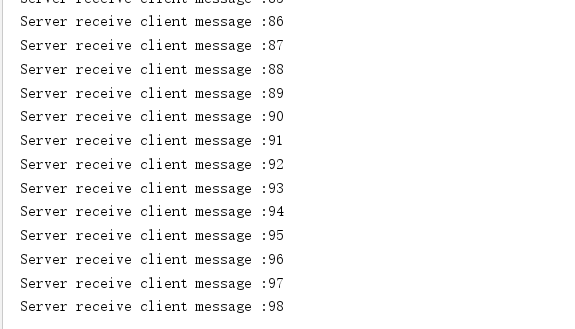
原因也很简单,我们的服务端代码中声明childGroup时用到了下面的定义,这就意味着服务端处理客户端连接是采用多线程的,而多线程操作同一个static变量是存在线程安全问题的。
EventLoopGroup workerGroup = new NioEventLoopGroup();
所以改造方式有两种,要么将childGroup线程数改为1。
EventLoopGroup workerGroup = new NioEventLoopGroup(1);
要么将sum改为原子类。
public class ThreadSecurityServerHandler extends ChannelInboundHandlerAdapter {

    private static AtomicInteger sum = new AtomicInteger(0);


    //每次收到客户端的请求就+1
    public void channelRead(ChannelHandlerContext ctx, Object msg) {

        System.out.println("Server receive client message :" + sum.addAndGet(1));
    }

    @Override
    public void channelReadComplete(ChannelHandlerContext ctx) {
        ctx.flush();
    }

    @Override
    public void exceptionCaught(ChannelHandlerContext ctx, Throwable cause) {
        cause.printStackTrace();
        ctx.close();
    }
}
2
3
4
5
6
7
8
9
10
11
12
13
14
15
16
17
18
19
20
21
22
经过上述两种方式改造后线程安全问题都能解决。
# 多连接使用共性处理器
在看一个例子,多个客户端公用一个业务处理向服务端建立连接,当连接超过1000个的时候就不发消息了。
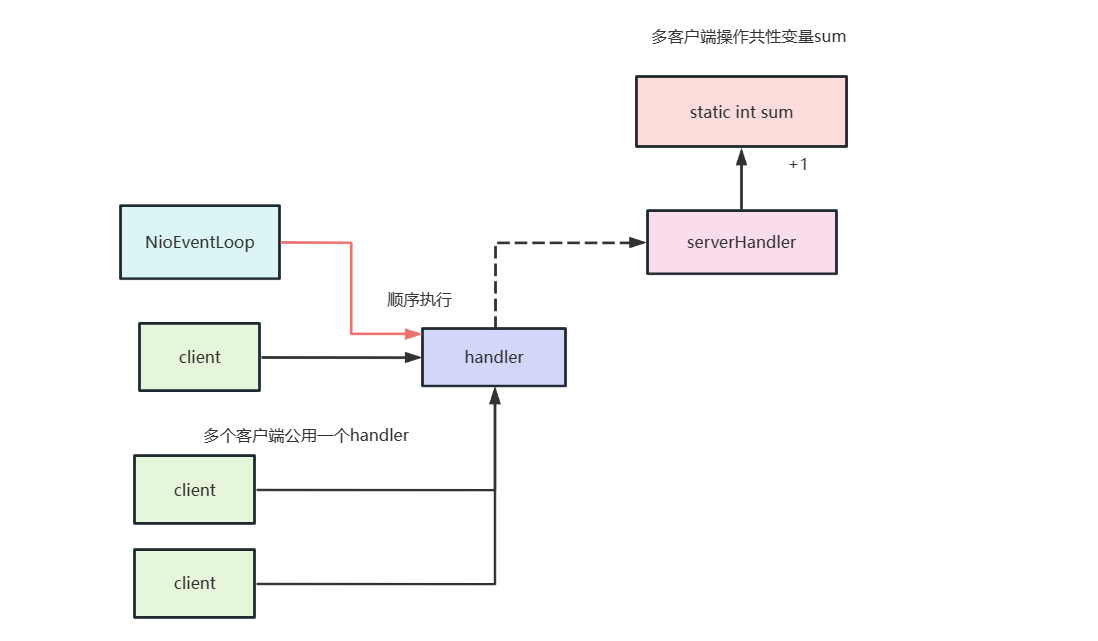
了解需求后,我们就可以开始编码了,服务端模板代码和上述一样就不多赘述了,唯一改变的就是业务处理加了个发送消息的逻辑。
public class ThreadSecurityServerHandler extends ChannelInboundHandlerAdapter {

    private static AtomicInteger sum = new AtomicInteger(0);
//    private static int sum1 = 0;


    //每次收到客户端的请求就+1
    public void channelRead(ChannelHandlerContext ctx, Object msg) {
        System.out.println("Server receive client message :" + sum.addAndGet(1));
        ctx.write(msg);
    }

    @Override
    public void channelReadComplete(ChannelHandlerContext ctx) {
        ctx.flush();
    }

    @Override
    public void exceptionCaught(ChannelHandlerContext ctx, Throwable cause) {
        cause.printStackTrace();
        ctx.close();
    }
}
2
3
4
5
6
7
8
9
10
11
12
13
14
15
16
17
18
19
20
21
22
23
这里我们看看就介绍一下客户端代码,可以看到客户端启动类的整体逻辑没变,只不过业务处理器变为SharableClientHandler且对所有连接共享。
public class NoThreadSecurityClient {


	public void connect() throws Exception {
		EventLoopGroup group = new NioEventLoopGroup(8);


		SharableClientHandler sharableClientHandler = new SharableClientHandler();

		Bootstrap b = new Bootstrap();
		b.group(group)
				.channel(NioSocketChannel.class)
				.option(ChannelOption.TCP_NODELAY, true)
				.handler(new ChannelInitializer<SocketChannel>() {
					@Override
					public void initChannel(SocketChannel ch) throws Exception {
						ch.pipeline().addLast(sharableClientHandler);
					}
				});


		//异步进行100次连接工作
		ChannelFuture f = null;
		for (int i = 0; i < 100; i++) {
			f = b.connect("127.0.0.1", 9999).sync();
		}

		f.channel().closeFuture().sync();
		f.channel().closeFuture().addListener(new ChannelFutureListener() {
			@Override
			public void operationComplete(ChannelFuture future) throws Exception {
				group.shutdownGracefully();
			}
		});
	}

	public static void main(String[] args) throws Exception {
		new NoThreadSecurityClient().connect();
	}
}
2
3
4
5
6
7
8
9
10
11
12
13
14
15
16
17
18
19
20
21
22
23
24
25
26
27
28
29
30
31
32
33
34
35
36
37
38
39
40
然后我们再来看看业务处理器的代码,很简单,加了Sharable注解起到共享作用,每次收到服务端的请求之后自增一下,到10000次后就不发消息了。
@ChannelHandler.Sharable
public class SharableClientHandler extends ChannelInboundHandlerAdapter {
    int counter1 = 0;
//	AtomicInteger counter = new AtomicInteger(0);

    static final int MSG_SIZE = 256;

    @Override
    public void channelActive(ChannelHandlerContext ctx) {
        ByteBuf firstMessage = Unpooled.buffer(MSG_SIZE);
        for (int i = 0; i < firstMessage.capacity(); i++) {
            firstMessage.writeByte((byte) i);
        }
        ctx.writeAndFlush(firstMessage);
    }

    @Override
    public void channelRead(ChannelHandlerContext ctx, Object msg) {
        ByteBuf req = (ByteBuf) msg;

        System.out.println("client counter=" + counter1);
        if (counter1++ <= 10000)
            ctx.write(msg);
    }


    @Override
    public void channelReadComplete(ChannelHandlerContext ctx) {
        ctx.flush();
    }

    @Override
    public void exceptionCaught(ChannelHandlerContext ctx, Throwable cause) {
        cause.printStackTrace();
        ctx.close();
    }
}
2
3
4
5
6
7
8
9
10
11
12
13
14
15
16
17
18
19
20
21
22
23
24
25
26
27
28
29
30
31
32
33
34
35
36
37
最终线程安全问题出现了,多个连接共享一个业务处理器就和上图一样存在安全问题。
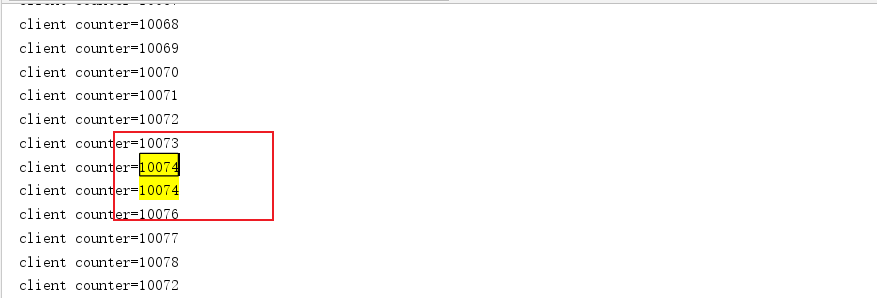
解决方式也很简单,和服务端代码一样,使用原子类即可解决,改造后的代码如下所示,读者可以自行查看输出结果,确实没有重复的数字。
@ChannelHandler.Sharable
public class SharableClientHandler extends ChannelInboundHandlerAdapter {
//    int counter1 = 0;
	AtomicInteger counter = new AtomicInteger(0);

    static final int MSG_SIZE = 256;

    @Override
    public void channelActive(ChannelHandlerContext ctx) {
        ByteBuf firstMessage = Unpooled.buffer(MSG_SIZE);
        for (int i = 0; i < firstMessage.capacity(); i++) {
            firstMessage.writeByte((byte) i);
        }
        ctx.writeAndFlush(firstMessage);
    }

    @Override
    public void channelRead(ChannelHandlerContext ctx, Object msg) {
        ByteBuf req = (ByteBuf) msg;

        System.out.println("client counter=" + counter.addAndGet(1));
        if (counter.get() <= 10000)
            ctx.write(msg);
    }


    @Override
    public void channelReadComplete(ChannelHandlerContext ctx) {
        ctx.flush();
    }

    @Override
    public void exceptionCaught(ChannelHandlerContext ctx, Throwable cause) {
        cause.printStackTrace();
        ctx.close();
    }
}
2
3
4
5
6
7
8
9
10
11
12
13
14
15
16
17
18
19
20
21
22
23
24
25
26
27
28
29
30
31
32
33
34
35
36
37
# 小结
上述我们介绍了两个Netty关于服务端和客户端的并发安全问题,这里我们给出两个建议:
- 非必要不要共享一个业务处理器。
- 如果业务处理器非要共享,请对共享变量做好并发控制。
# Netty并发失效问题
# 错误代码示例
了解了ChannelHanlder线程安全问题之后,我们再来聊一聊ChannelHanlder的并发问题,再抛出问题之前我们不妨看一个例子,我们现在有一个客户端,通过channel建立连接之后,会连续发送100个消息,服务端收到后简单处理一下,即释放空间。
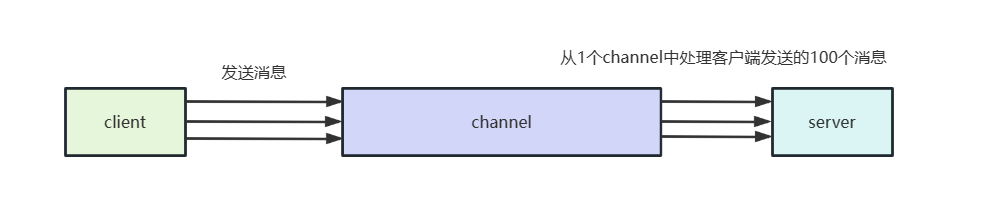
大概了解需求之后,我们不妨看看客户端的代码的启动类,可以看到这个代码就是标准的模板代码,通过异步的方式和服务端的9999端口建立连接。
/**
 * 单客户端发送多个消息
 */
public class ConcurrentPerformanceClient {
    static final int MSG_SIZE = 256;

    public void connect() throws Exception {
        //一个线程
        EventLoopGroup group = new NioEventLoopGroup(1);
        Bootstrap b = new Bootstrap();
        b.group(group)
                .channel(NioSocketChannel.class)
                .option(ChannelOption.TCP_NODELAY, true)
                .handler(new ChannelInitializer<SocketChannel>() {
                    @Override
                    public void initChannel(SocketChannel ch) throws Exception {
                        //业务处理器,会连发100次消息
                        ch.pipeline().addLast(new ConcurrentPerformanceClientHandler());
                    }
                });
        ChannelFuture f = b.connect("127.0.0.1", 9999).sync();
        f.channel().closeFuture().addListener(new ChannelFutureListener() {
            @Override
            public void operationComplete(ChannelFuture future) throws Exception {
                group.shutdownGracefully();
            }
        });
    }

    public static void main(String[] args) throws Exception {
        new ConcurrentPerformanceClient().connect();
    }
}
2
3
4
5
6
7
8
9
10
11
12
13
14
15
16
17
18
19
20
21
22
23
24
25
26
27
28
29
30
31
32
33
再看看业务处理器,每次和服务端建立连接后就会调用channelActive方法,每隔1s发送100个消息。
public class ConcurrentPerformanceClientHandler extends ChannelInboundHandlerAdapter {
    static ScheduledExecutorService scheduledExecutorService = Executors.newSingleThreadScheduledExecutor();

    @Override
    public void channelActive(ChannelHandlerContext ctx) {

        //定时任务 每秒发送100个消息
        scheduledExecutorService.scheduleAtFixedRate(() -> {
            //发送100次消息
            for (int i = 0; i < 100; i++) {
                //组装消息并发送
                ByteBuf firstMessage = Unpooled.buffer(ConcurrentPerformanceClient.MSG_SIZE);
                for (int k = 0; k < firstMessage.capacity(); k++) {
                    firstMessage.writeByte((byte) k);
                }

                ctx.writeAndFlush(firstMessage);
            }
        }, 0, 1000, TimeUnit.MILLISECONDS);
    }

    @Override
    public void exceptionCaught(ChannelHandlerContext ctx, Throwable cause) {
        cause.printStackTrace();
        ctx.close();
    }
}
2
3
4
5
6
7
8
9
10
11
12
13
14
15
16
17
18
19
20
21
22
23
24
25
26
27
以上便是客户端的代码,我们再来看看服务端的代码,为了更好的监控单一客户端连接channel的情况我们把主从reactor线程数都设置为1,然后创建一个包含100个线程的DefaultEventExecutorGroup处理业务handler。
public class ConcurrentPerformanceServer {
    static final EventExecutorGroup executor = new DefaultEventExecutorGroup(100);

    public static void main(String[] args) throws Exception {
        //主从reactor
        EventLoopGroup bossGroup = new NioEventLoopGroup(1);
        EventLoopGroup workerGroup = new NioEventLoopGroup(1);


        ServerBootstrap b = new ServerBootstrap();
        b.group(bossGroup, workerGroup)
                .channel(NioServerSocketChannel.class)
                .option(ChannelOption.SO_BACKLOG, 100)
                .childHandler(new ChannelInitializer<SocketChannel>() {
                    @Override
                    public void initChannel(SocketChannel ch) throws Exception {
                        ch.config().setAllocator(UnpooledByteBufAllocator.DEFAULT);
                        ChannelPipeline p = ch.pipeline();
                        //服务端业务处理器
                        p.addLast(executor, new ConcurrentPerformanceServerHandler());
                    }
                }).childOption(ChannelOption.SO_RCVBUF, 8 * 1024)
                .childOption(ChannelOption.SO_SNDBUF, 8 * 1024);

        ChannelFuture f = b.bind(9999).sync();

        f.channel().closeFuture().addListener((ChannelFutureListener) future -> {
            bossGroup.shutdownGracefully();
            workerGroup.shutdownGracefully();
        });
    }
}
2
3
4
5
6
7
8
9
10
11
12
13
14
15
16
17
18
19
20
21
22
23
24
25
26
27
28
29
30
31
32
然后再来看看业务处理器,逻辑很简单大概做的就是统计qps,每次建立连接时就输出原子类counter 的值,而该值的变化则是在channelRead时发生自增。
为什么这么做呢?原因很简单,netty每次收到一个消息就会调用channelRead方法,所以我们用该方法作为计数统计qps最合适不过。有了计数之后,自然是需要监控,而netty服务端每次和客户端建立连接时都会调用channelActive方法,所以用该方法输出上一次处理的消息的counter最合适不过。由此我们得出了下面这样一段写法。
public class ConcurrentPerformanceServerHandler extends ChannelInboundHandlerAdapter {

    static AtomicInteger counter = new AtomicInteger(0);
    static ScheduledExecutorService scheduledExecutorService = Executors.newSingleThreadScheduledExecutor();


    /**
     * 每次建立了连接就统计qps然后清零
     * @param ctx
     * @throws Exception
     */
    @Override
    public void channelActive(ChannelHandlerContext ctx) throws Exception {
        scheduledExecutorService.scheduleAtFixedRate(() -> {
            int qps = counter.getAndSet(0);
            System.out.println("The server QPS is : " + qps);
        }, 0, 1000, TimeUnit.MILLISECONDS);
    }

    @Override
    public void channelRead(ChannelHandlerContext ctx, Object msg) {
        ((ByteBuf) msg).release();
        //没收到一个消息原子类计数器就+1
        counter.incrementAndGet();
        //业务逻辑处理,模拟业务访问DB、缓存等,时延从100-1000毫秒之间不等
        Random random = new Random();
        try {
            TimeUnit.MILLISECONDS.sleep(random.nextInt(1000));
        } catch (Exception e) {
            e.printStackTrace();
        }
    }

    @Override
    public void exceptionCaught(ChannelHandlerContext ctx, Throwable cause) {
        cause.printStackTrace();
        ctx.close();
    }
}
2
3
4
5
6
7
8
9
10
11
12
13
14
15
16
17
18
19
20
21
22
23
24
25
26
27
28
29
30
31
32
33
34
35
36
37
38
39
# 问题复现
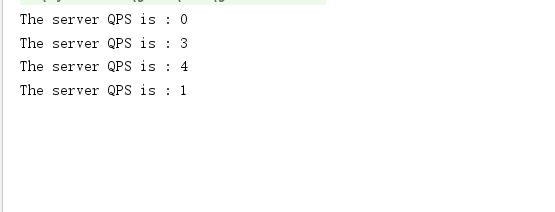
了解了代码整体流程之后,我们不妨将服务端和客户端都跑起来。从输出结果来看,qps的值基本都在10以内,这是为什么呢?
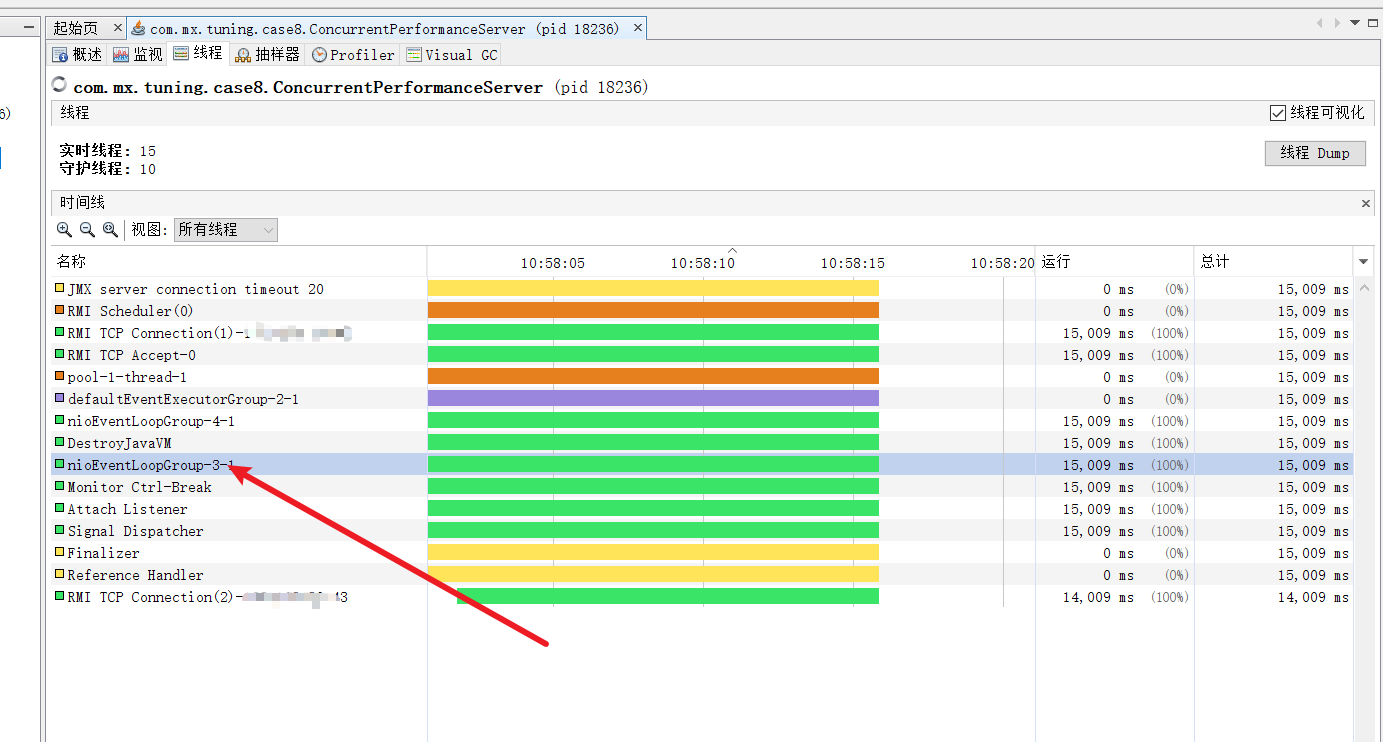
我们使用jvisualvm查看了一下服务端的线程数,可以看到处理客户端消息的线程永远只有一个,等于说我们的并发配置是失效的。
# 源码分析
为了了解出现并发失效问题的原因,我们不妨通过源码找一下答案。所以我们在挂业务处理的代码处插一个断点。然后启动服务端和客户端,代码就会走到这个断点。
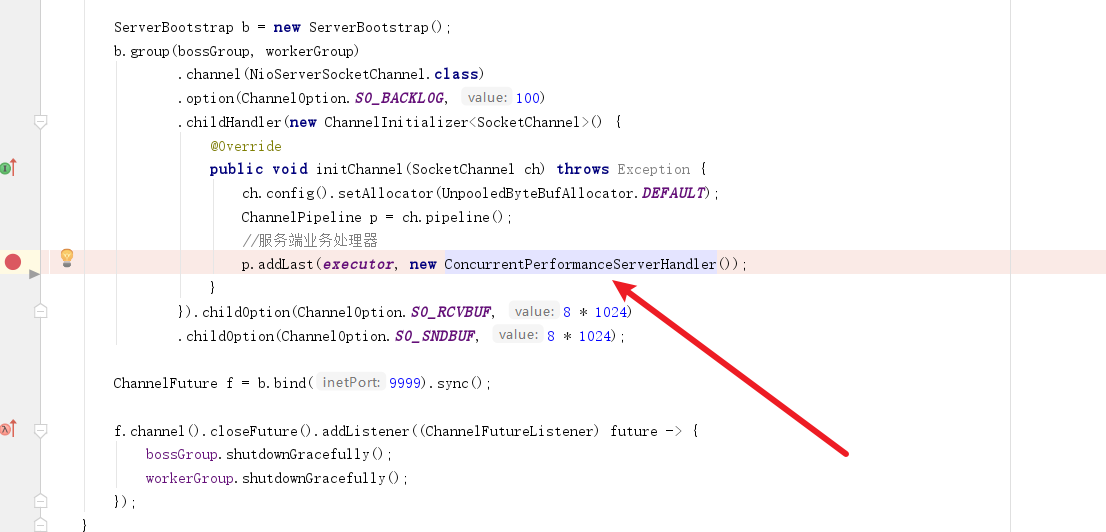
我们首先会步入last方法,它会做以下几件事:
- 遍历处理器,调用addLast添加处理器。
- 完成后返回当前pieple。
因为我们想看看线程池处理发生了什么,我们就必须看看线程池在此期间做了什么事,我们步入addLast方法看看。
 @Override
    public final ChannelPipeline addLast(EventExecutorGroup executor, ChannelHandler... handlers) {
        if (handlers == null) {
            throw new NullPointerException("handlers");
        }

        for (ChannelHandler h: handlers) {
            if (h == null) {
                break;
            }
            addLast(executor, null, h);
        }

        return this;
    }
2
3
4
5
6
7
8
9
10
11
12
13
14
15
走到addLast,我们看到我们的线程池首先被newContext方法调用了,我们不妨步入看看它做了什么,
@Override
    public final ChannelPipeline addLast(EventExecutorGroup group, String name, ChannelHandler handler) {
        final AbstractChannelHandlerContext newCtx;
        synchronized (this) {
            checkMultiplicity(handler);

            newCtx = newContext(group, filterName(name, handler), handler);

            addLast0(newCtx);

           ......略
        return this;
    }
2
3
4
5
6
7
8
9
10
11
12
13
步入之后我们会看到newContext方法会调用childExecutor会线程池进行一些处理工作,这些操作都和线程池相关,所以我们都需要步入看看。
private AbstractChannelHandlerContext newContext(EventExecutorGroup group, String name, ChannelHandler handler) {
        return new DefaultChannelHandlerContext(this, childExecutor(group), name, handler);
    }
2
3
最终代码走到了这里,结果笔者调试发现在该代码首先会创建一个map,该map专用于绑定通道对应的通道事件,这就使得我们上述的channel都会被我们所创建的线程池DefaultEventExecutorGroup其中的一个执行器绑定,所以无论客户端发送多少个消息,只要是同一个chanel的连接,都会只用一个线程处理。
private EventExecutor childExecutor(EventExecutorGroup group) {
       ....略
        Map<EventExecutorGroup, EventExecutor> childExecutors = this.childExecutors;
        if (childExecutors == null) {
            // 创建一个childExecutors 的map,使用4的大小,因为大多数人只使用一个额外的EventExecutor。
            childExecutors = this.childExecutors = new IdentityHashMap<EventExecutorGroup, EventExecutor>(4);
        }
        //将其中一个子执行器固定一次并记住它,以便使用相同的子执行器,来激发同一通道的事件。
        EventExecutor childExecutor = childExecutors.get(group);
        if (childExecutor == null) {
        //从中取出一个线程,和通道事件绑定
            childExecutor = group.next();
            childExecutors.put(group, childExecutor);
        }
        return childExecutor;
    }
2
3
4
5
6
7
8
9
10
11
12
13
14
15
16
返回这个单一执行器之后,DefaultChannelHandlerContext方法就会拿着这个executor封装成一个上下文handler。
DefaultChannelHandlerContext(
            DefaultChannelPipeline pipeline, EventExecutor executor, String name, ChannelHandler handler) {
        super(pipeline, executor, name, isInbound(handler), isOutbound(handler));
       //我们的执行器被服装成一个上下文的handler
        this.handler = handler;
    }
2
3
4
5
6
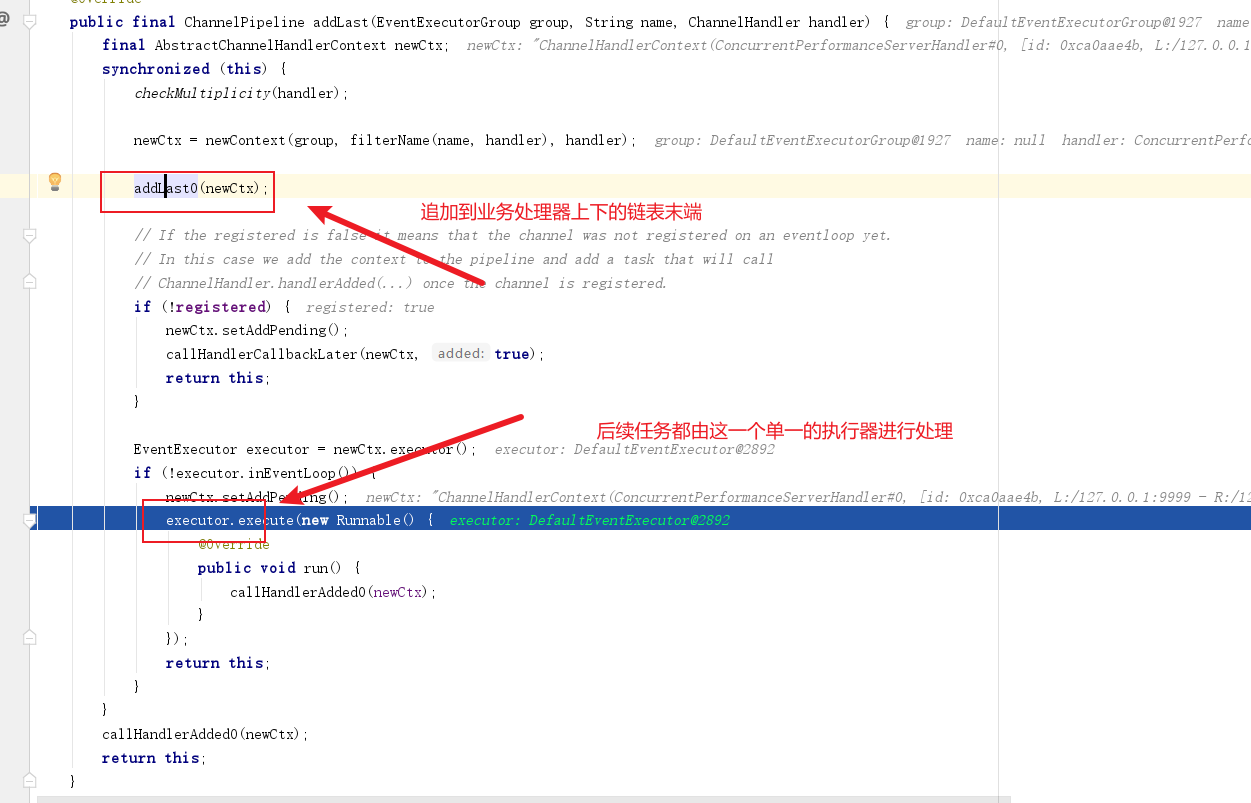
最终我们再次回到addLast方法,可以看到完成执行器封装后,它会将这个线程池转为单一线程的去处理用户的发送的消息,由于该业务处理器已经在上文IdentityHashMap<EventExecutorGroup, EventExecutor>(4)这个map中和单一执行器绑定,所以后续当前通道无论发送多少事件都会由这个线程处理。
# 解决方案
由此可知在单一连接场景下,服务端永远只有一个执行器负责,对于我们这种连接少,消息多大部分处于业务逻辑的IO消耗中,所以我们需要在通道读取到事件之后,将消息处理的逻辑放到异步线程池中。
所以这里我们需要修改一下业务处理器,修改后的代码如下,可以看到,我们创建了一个线程池executorService ,每当收到消息之后,都会将消息提交到业务线程池中,确保netty的线程可以尽可能多接收单一通道的消息.
public class ConcurrentPerformanceServerHandlerV2 extends ChannelInboundHandlerAdapter {
    static AtomicInteger counter = new AtomicInteger(0);
    static ScheduledExecutorService scheduledExecutorService = Executors.newSingleThreadScheduledExecutor();
    static final ExecutorService executorService = Executors.newFixedThreadPool(100);


    @Override
    public void channelActive(ChannelHandlerContext ctx) throws Exception {
        scheduledExecutorService.scheduleAtFixedRate(() -> {
            int qps = counter.getAndSet(0);
            System.out.println("The server v2 QPS is : " + qps);
        }, 2, 1000, TimeUnit.MILLISECONDS);
    }


    public void channelRead(ChannelHandlerContext ctx, Object msg) {
        System.out.println("工作线程:" + Thread.currentThread().getName());
        ((ByteBuf) msg).release();

        //将IO任务提交到业务线程池中处理,确保netty的线程可以尽可能多接收单一通道的消息
        executorService.execute(() -> {
            counter.incrementAndGet();
            //业务逻辑处理,模拟业务访问DB、缓存等,时延从100-1000毫秒之间不等
            Random random = new Random();
            try {
                TimeUnit.MILLISECONDS.sleep(random.nextInt(1000));
            } catch (Exception e) {
                e.printStackTrace();
            }
        });
    }

    @Override
    public void userEventTriggered(ChannelHandlerContext ctx, Object evt) throws Exception {
        if (evt == SslHandshakeCompletionEvent.SUCCESS) {
            //执行流控逻辑
        }
    }

    @Override
    public void exceptionCaught(ChannelHandlerContext ctx, Throwable cause) {
        cause.printStackTrace();
        ctx.close();
    }
}
2
3
4
5
6
7
8
9
10
11
12
13
14
15
16
17
18
19
20
21
22
23
24
25
26
27
28
29
30
31
32
33
34
35
36
37
38
39
40
41
42
43
44
45
46
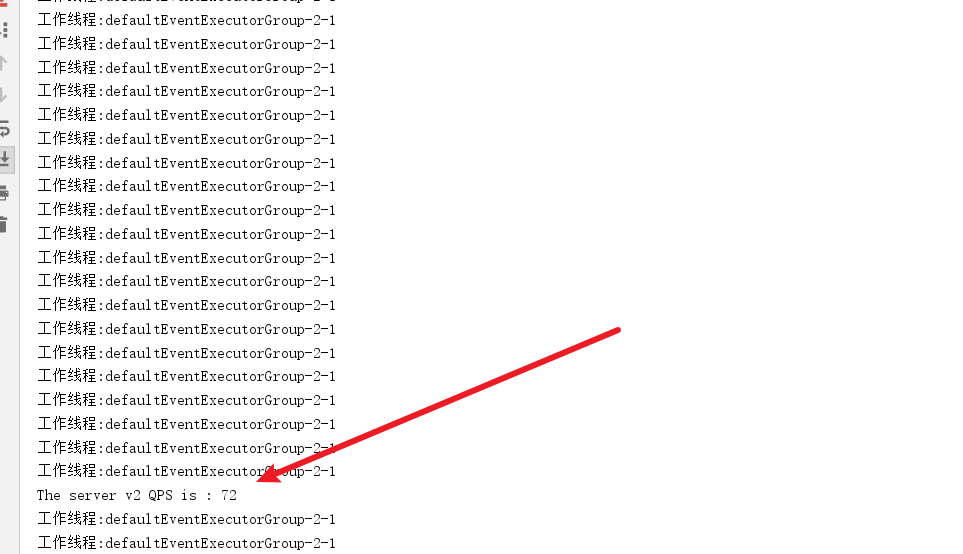
经过修改之后我们查看qps,瞬间提升了不少,系统运行稳定的情况下,qps基本可以达到100.
# 多通道型ChannelHanlder并发优化
了解上述单通道多消息类型的使用场景,我们不妨再来看看多通道 ,单服务端的场景。如下图所示,该场景单位时间内会有100个并发的连接请求,建立连接后同时向服务端发送1条消息。同样的,我们也希望能qps能够达到100。
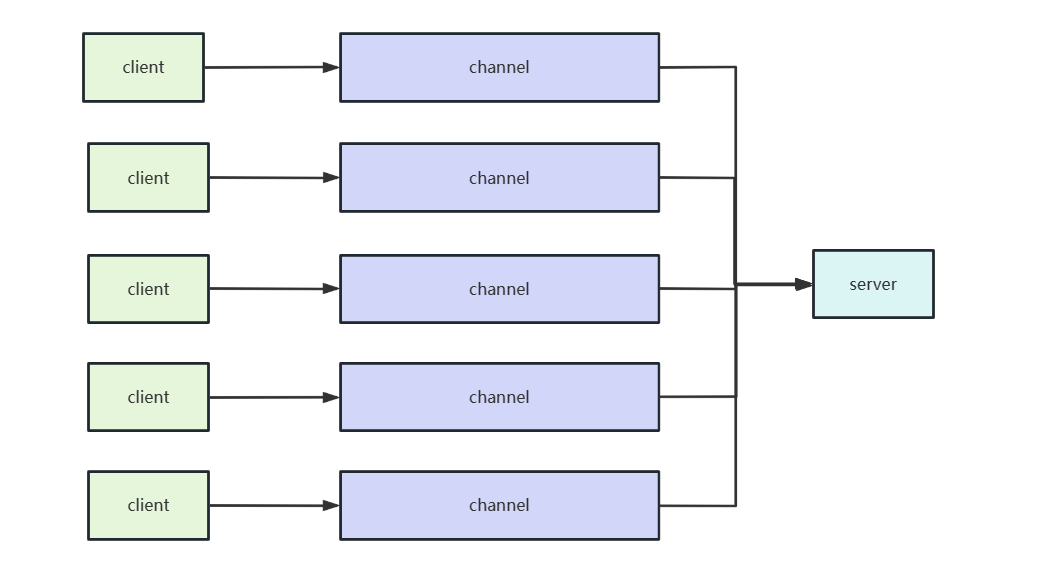
对此,我们不妨来看看客户端启动类的代码,如下所示,可以看到模板代码后,启动类会建立100个连接。
/**
 * 多并发channel连接服务端
 */
public class MulChannelPerformanceClient {
    static final int MSG_SIZE = 256;

    public void connect() throws Exception {
        EventLoopGroup group = new NioEventLoopGroup(8);
        Bootstrap b = new Bootstrap();
        b.group(group)
                .channel(NioSocketChannel.class)
                .option(ChannelOption.TCP_NODELAY, true)
                .handler(new ChannelInitializer<SocketChannel>() {
                    @Override
                    public void initChannel(SocketChannel ch) throws Exception {
                        //模拟100分并发发消息
                        ch.pipeline().addLast(new ConcurrentPerformanceClientHandlerV2());
                    }
                });
        ChannelFuture f = null;

        // 100个异步连接到服务端
        for (int i = 0; i < 100; i++) {
            f = b.connect("127.0.0.1", 9999).sync();
        }


        f.channel().closeFuture().addListener(new ChannelFutureListener() {
            @Override
            public void operationComplete(ChannelFuture future) throws Exception {
                future.channel().close();
            }
        });
    }

    public static void main(String[] args) throws Exception {
        new MulChannelPerformanceClient().connect();
    }
}
2
3
4
5
6
7
8
9
10
11
12
13
14
15
16
17
18
19
20
21
22
23
24
25
26
27
28
29
30
31
32
33
34
35
36
37
38
39
而每个客户端建立连接之后,就会创建一个256字节的数据,每个1s发送一次给服务端。
public class ConcurrentPerformanceClientHandlerV2 extends ChannelInboundHandlerAdapter {
	static ScheduledExecutorService scheduledExecutorService = Executors.newSingleThreadScheduledExecutor();

	@Override
	public void channelActive(ChannelHandlerContext ctx) {
		scheduledExecutorService.scheduleAtFixedRate(() -> {
			ByteBuf firstMessage = Unpooled.buffer(ConcurrentPerformanceClient.MSG_SIZE);
			for (int k = 0; k < firstMessage.capacity(); k++) {
				firstMessage.writeByte((byte) k);
			}
			ctx.writeAndFlush(firstMessage);
		}, 0, 1000, TimeUnit.MILLISECONDS);
	}

	@Override
	public void exceptionCaught(ChannelHandlerContext ctx, Throwable cause) {
		cause.printStackTrace();
		ctx.close();
	}
}
2
3
4
5
6
7
8
9
10
11
12
13
14
15
16
17
18
19
20
可以看到这种场景和上一个案例的区别在于,当前场景是连接数多,且每个连接的耗时在100ms-1000ms不等,所以我们服务端的业务处理就需要解决收包的问题了。
这样一来,我们最初的代码就派上用场了,服务端启动类的代码就可以改为下面这种形式了,将workerGroup设置为默认的CPU核心的两倍。
并且创建一个DefaultEventExecutorGroup和业务处理器绑定,这样一来,从Reactor即我们下面声明的workerGroup就有足够的线程处理任务,而当前通道事件就会和DefaultEventExecutorGroup绑定,从而实现确保多并发连接channel的情况下,有足够且合理的线程处理任务。
public class ConcurrentPerformanceServer {
    static final EventExecutorGroup executor = new DefaultEventExecutorGroup(100);

    public static void main(String[] args) throws Exception {
        //主从reactor
        EventLoopGroup bossGroup = new NioEventLoopGroup(1);
        EventLoopGroup workerGroup = new NioEventLoopGroup();


        ServerBootstrap b = new ServerBootstrap();
        b.group(bossGroup, workerGroup)
                .channel(NioServerSocketChannel.class)
                .option(ChannelOption.SO_BACKLOG, 100)
                .childHandler(new ChannelInitializer<SocketChannel>() {
                    @Override
                    public void initChannel(SocketChannel ch) throws Exception {
                        ch.config().setAllocator(UnpooledByteBufAllocator.DEFAULT);
                        ChannelPipeline p = ch.pipeline();
                        //服务端业务处理器
                        p.addLast(executor, new ConcurrentPerformanceServerHandler());
                    }
                }).childOption(ChannelOption.SO_RCVBUF, 8 * 1024)
                .childOption(ChannelOption.SO_SNDBUF, 8 * 1024);

        ChannelFuture f = b.bind(9999).sync();

        f.channel().closeFuture().addListener((ChannelFutureListener) future -> {
            bossGroup.shutdownGracefully();
            workerGroup.shutdownGracefully();
        });
    }
}
2
3
4
5
6
7
8
9
10
11
12
13
14
15
16
17
18
19
20
21
22
23
24
25
26
27
28
29
30
31
32
注意,此时连接是并发的,所以我们统计qps不在使用channelActive方法了,改用静态代码块统计所有并发线程的任务的channelRead事件。
public class ConcurrentPerformanceServerHandler extends ChannelInboundHandlerAdapter {

    static AtomicInteger counter = new AtomicInteger(0);
    static ScheduledExecutorService scheduledExecutorService = Executors.newSingleThreadScheduledExecutor();


    /**
     * 客户端多个channel并发连接过来的,所以我们不能用channelActive进行统计
     */
    static {
        scheduledExecutorService.scheduleAtFixedRate(() -> {
            int qps = counter.getAndSet(0);
            System.out.println("The server QPS is : " + qps);
        }, 0, 1000, TimeUnit.MILLISECONDS);
    }


    @Override
    public void channelRead(ChannelHandlerContext ctx, Object msg) {
        ((ByteBuf) msg).release();
        //没收到一个消息原子类计数器就+1
        counter.incrementAndGet();
        //业务逻辑处理,模拟业务访问DB、缓存等,时延从100-1000毫秒之间不等
        Random random = new Random();
        try {
            TimeUnit.MILLISECONDS.sleep(random.nextInt(1000));
        } catch (Exception e) {
            e.printStackTrace();
        }
    }

    @Override
    public void exceptionCaught(ChannelHandlerContext ctx, Throwable cause) {
        cause.printStackTrace();
        ctx.close();
    }
}
2
3
4
5
6
7
8
9
10
11
12
13
14
15
16
17
18
19
20
21
22
23
24
25
26
27
28
29
30
31
32
33
34
35
36
37
38
39
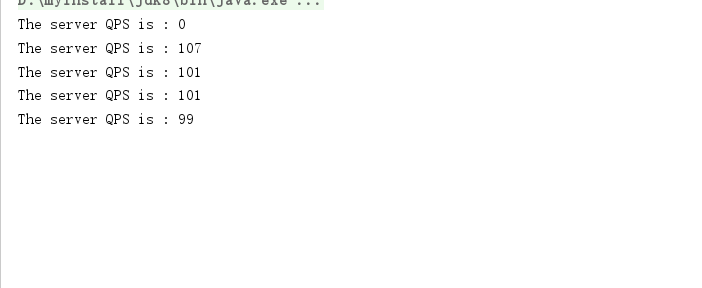
完成后将服务端和客户端代码都启动,可以看到qps基本可以达到预期。
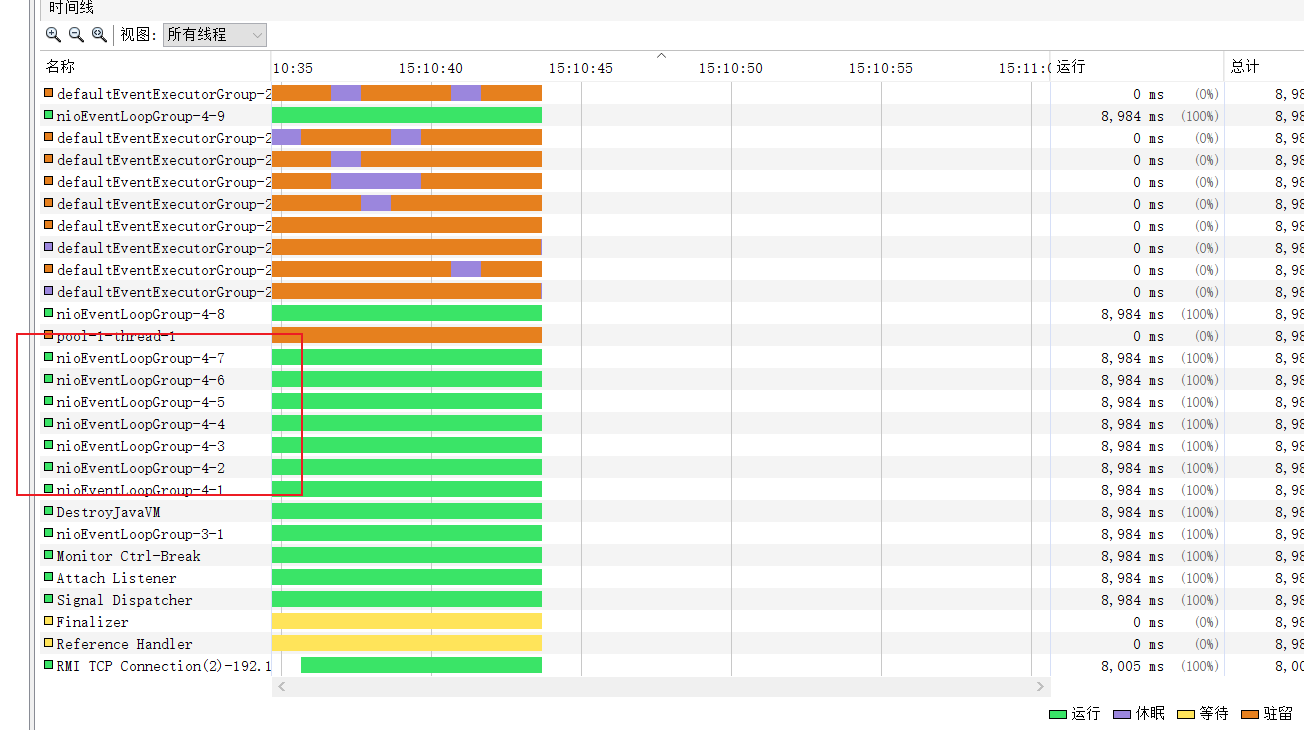
同样的,使用jvisualvm可以看到workerGroup也是多线程的调度将任务分配到对应的piepeline上交由该piepeline上的handler处理。
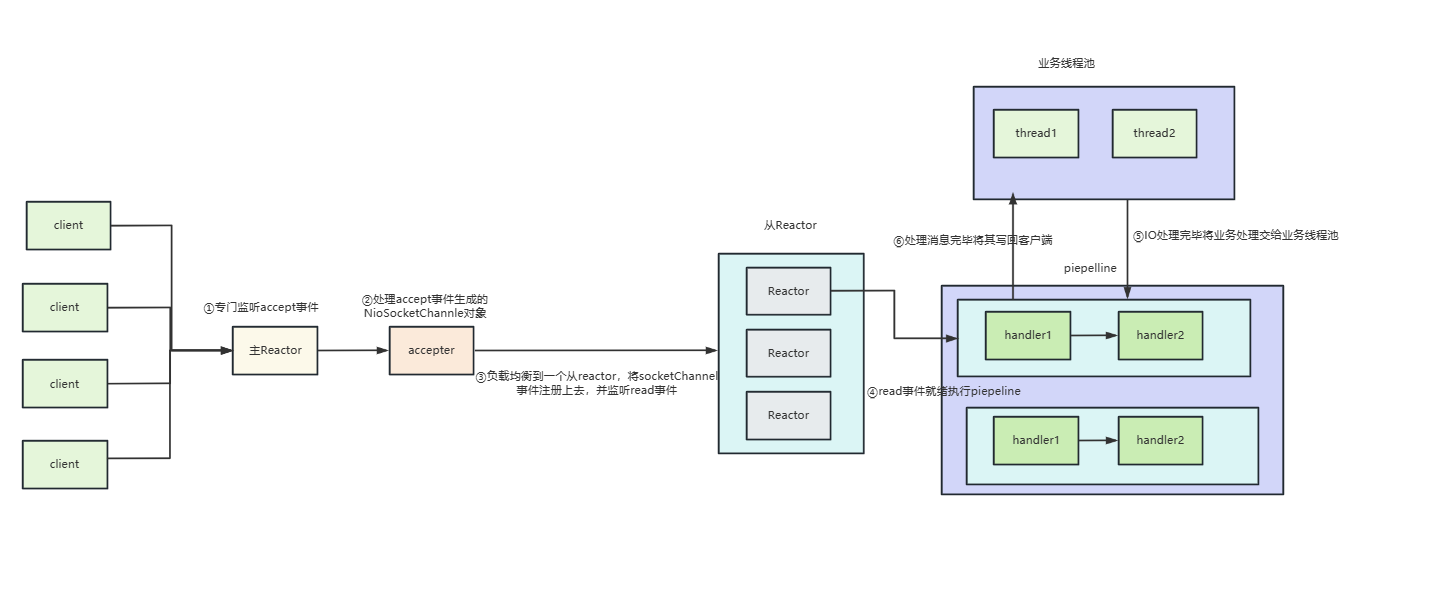
而每个客户端都有独立的piepeline,plepeline中的handler共享一个线程池,这就使得每个客户端read事件就绪之后,就会将业务处理器的任务提交到我们的业务线程池中,如下图
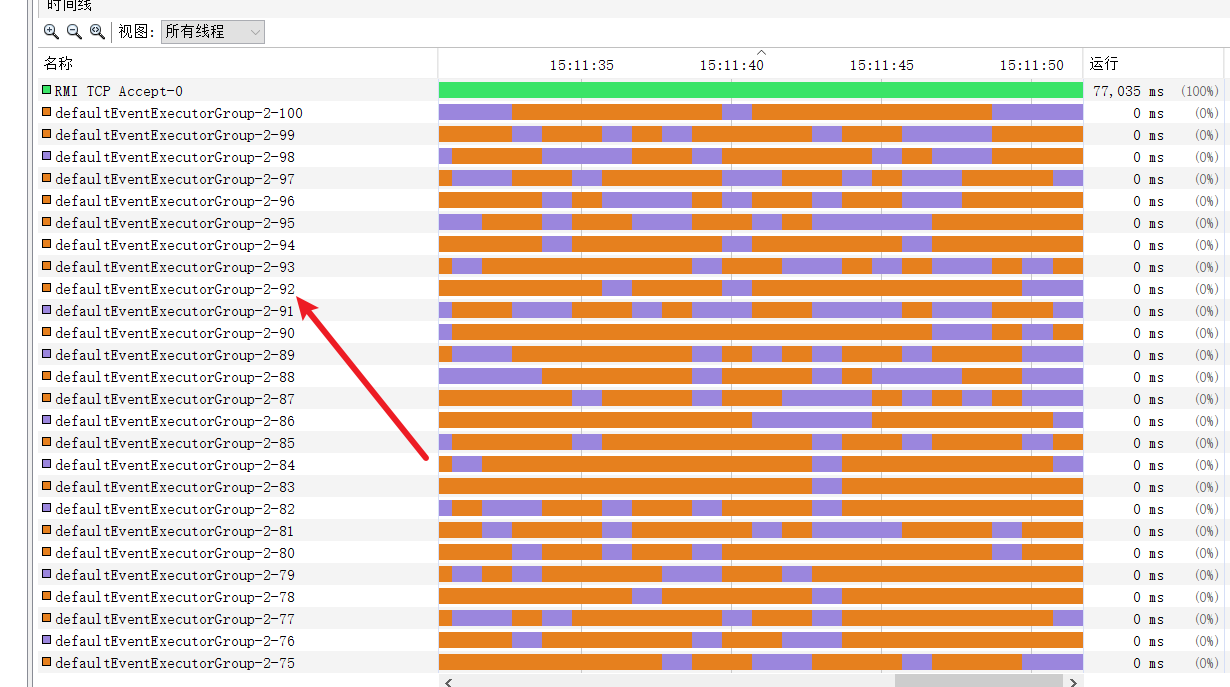
所以我们的业务线程池中的100个线程池都会利用到了,qps自然就达到我们所预期的100。
# 小结
对此我们不妨小结一下,不同场景下ChannelHanlder的用法:
- 对于客户端并发连接数不多,但是每个客户端channel业务请求阻塞较长的,我们建议在业务处理时,将耗时的地方提交到业务线程池中。
- 对于客户端并发连接数多,但channel阻塞不耗时的场景,我们只需按照机器性能调整好业务处理器对应的DefaultEventExecutorGroup即可。
