
 Gateway全局异常处理及请求响应监控
# 前言
我们在上一篇文章基于压测进行Feign调优 (opens new window)完成的服务间调用的性能调优,此时我们也关注到一个问题,如果我们统一从网关调用服务,但是网关因为某些原因报错或者没有找到服务怎么办呢?
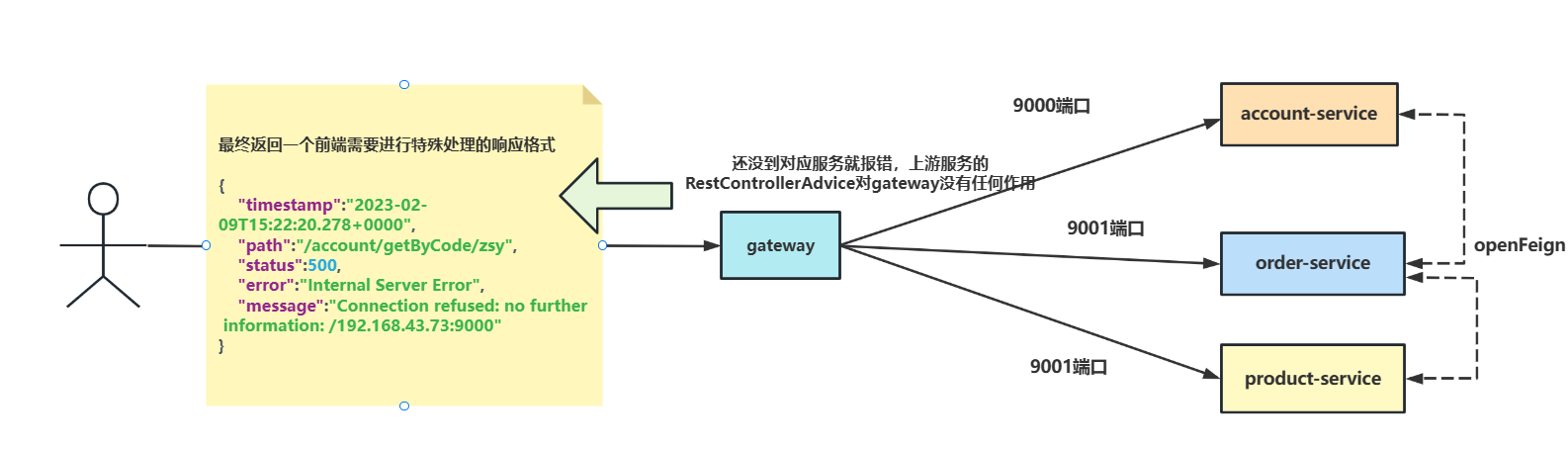
如下所示,笔者通过网关调用account服务,但是account服务还没起来。此时请求还没有到达account就报错了,这就意味着我们服务中编写的@RestControllerAdvice对网关没有任何作用。
curl 127.0.0.1:8090/account/getByCode/zsy
2
响应结果如下,可以看到响应结果如下所示,要知道现如今的开发模式为前后端分离模式,前后端交互完全是基于协商好的格式,如果网关响应格式与我们规定的格式完全不一致,前端就需要特殊处理,这使得代码不仅会变得丑陋,对于后续的功能扩展的交互复杂度也会增加,而gateway默认响应错误如下:
{
    "timestamp":"2023-02-09T15:22:20.278+0000",
    "path":"/account/getByCode/zsy",
    "status":500,
    "error":"Internal Server Error",
    "message":"Connection refused: no further information: /192.168.43.73:9000"
}
2
3
4
5
6
7
# 网关异常默认处理
所以我们必须了解一下是什么原因导致网关报错会响应这个值。
我们在gateway源码中找到ErrorWebFluxAutoConfiguration这个自动装配类,可以看到下面这段代码,我们从中得知网关报错时默认使用DefaultErrorWebExceptionHandler 来返回结果,所以我们不妨看看这个类做了那些事情。
@Bean
	@ConditionalOnMissingBean(value = ErrorWebExceptionHandler.class, search = SearchStrategy.CURRENT)
	@Order(-1)
	public ErrorWebExceptionHandler errorWebExceptionHandler(ErrorAttributes errorAttributes) {
	//网关默认异常处理的handler
		DefaultErrorWebExceptionHandler exceptionHandler = new DefaultErrorWebExceptionHandler(errorAttributes,
				this.resourceProperties, this.serverProperties.getError(), this.applicationContext);
		exceptionHandler.setViewResolvers(this.viewResolvers);
		exceptionHandler.setMessageWriters(this.serverCodecConfigurer.getWriters());
		exceptionHandler.setMessageReaders(this.serverCodecConfigurer.getReaders());
		return exceptionHandler;
	}
2
3
4
5
6
7
8
9
10
11
12
我们不妨基于debug了解一下这个类,当我们服务没有注册到nacos,并通过网关调用报错时,代码就会走到下方,route 方法第一个参数是RequestPredicate谓词,而后者则是谓词的处理,进行renderErrorView,andRoute同理将报错的请求通过renderErrorResponse返回错误结果
@Override
//route 方法第一个参数是RequestPredicate谓词,而后者则是谓词的处理,进行renderErrorView,然后通过然后通过andRoute将报错的请求通过renderErrorResponse返回错误结果
	protected RouterFunction<ServerResponse> getRoutingFunction(ErrorAttributes errorAttributes) {
		return route(acceptsTextHtml(), this::renderErrorView).andRoute(all(), this::renderErrorResponse);
	}
2
3
4
5
我们不妨看看renderErrorResponse,可以看到一行getErrorAttributes,一旦步入我们就可以看到上文请求错误的结果格式
protected Mono<ServerResponse> renderErrorResponse(ServerRequest request) {
		boolean includeStackTrace = isIncludeStackTrace(request, MediaType.ALL);
		Map<String, Object> error = getErrorAttributes(request, includeStackTrace);
		return ServerResponse.status(getHttpStatus(error)).contentType(MediaType.APPLICATION_JSON_UTF8)
				.body(BodyInserters.fromObject(error));
	}
2
3
4
5
6
getErrorAttributes源码,可以看到组装的key值就是我们调试时响应的参数:
@Override
	public Map<String, Object> getErrorAttributes(ServerRequest request, boolean includeStackTrace) {
		Map<String, Object> errorAttributes = new LinkedHashMap<>();
		errorAttributes.put("timestamp", new Date());
		errorAttributes.put("path", request.path());
		Throwable error = getError(request);
		HttpStatus errorStatus = determineHttpStatus(error);
		errorAttributes.put("status", errorStatus.value());
		errorAttributes.put("error", errorStatus.getReasonPhrase());
		errorAttributes.put("message", determineMessage(error));
		handleException(errorAttributes, determineException(error), includeStackTrace);
		return errorAttributes;
	}
2
3
4
5
6
7
8
9
10
11
12
13
# 自定义异常处理
了解的默认错误处理,我们就可以改造,返回一个和普通服务一样的格式给前端告知网关报错。从上文我们可知网关默认错误处理时DefaultErrorWebExceptionHandler,通过类图我们可以发现它继承了一个ErrorWebExceptionHandler,所以我们也可以继承这个类重写一个Handler。
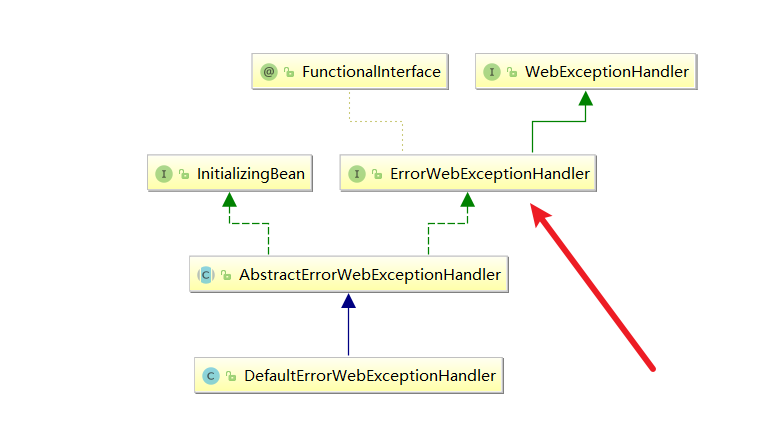
以笔者的代码如下,可以看到笔者使用Order注解强制获得最高异常处理优先级,然后使用bufferFactory.wrap方法传递自定义错误格式返回给前端。
@Slf4j
@Order(-1)
@Configuration
@RequiredArgsConstructor(onConstructor = @__(@Autowired))
public class GlobalErrorWebExceptionHandler implements ErrorWebExceptionHandler {

    private final ObjectMapper objectMapper;

    @Override
    public Mono<Void> handle(ServerWebExchange exchange, Throwable ex) {
        ServerHttpResponse response = exchange.getResponse();
        if (response.isCommitted()) {
            return Mono.error(ex);
        }

        // 设置返回值类型为json
        response.getHeaders().setContentType(MediaType.APPLICATION_JSON);

        //设置返回编码
        if (ex instanceof ResponseStatusException) {
            response.setStatusCode(((ResponseStatusException) ex).getStatus());
        }

        return response.writeWith(Mono.fromSupplier(() -> {
            DataBufferFactory bufferFactory = response.bufferFactory();
            try {
                //writeValueAsBytes 组装错误响应结果
                return bufferFactory.wrap(objectMapper.writeValueAsBytes(ResultData.fail(500, "网关捕获到异常:" + ex.getMessage())));
            } catch (JsonProcessingException e) {
                log.error("Error writing response", ex);
                return bufferFactory.wrap(new byte[0]);
            }
        }));
    }
}
2
3
4
5
6
7
8
9
10
11
12
13
14
15
16
17
18
19
20
21
22
23
24
25
26
27
28
29
30
31
32
33
34
35
36
37
最终返回的结果如下所示,可以看到结果和一般的服务调用报错格式一模一样,这样一来前端就无需为了网关报错加一个特殊处理的逻辑了
curl 127.0.0.1:8090/account/getByCode/zsy
2
输出结果
{
    "status":500,
    "message":"网关捕获到异常:503 SERVICE_UNAVAILABLE \"Unable to find instance for account-service\"",
    "data":null,
    "success":false,
    "timestamp":1675959617386
}
2
3
4
5
6
7
# 请求响应日志监控
对于微服务架构来说,监控是很重要的,在高并发场景情况下,很多问题我们都可以在网关请求响应中定位到,所以我们希望能有这么一种方式将用户日常请求响应的日志信息记录下来,便于日常运维和性能监控。
查阅了网上的资料发现,基于MongoDB进行网关请求响应数据采集是一种不错的方案,所以笔者本篇文章整理一下笔者如何基于网关过滤器结合MongoDB完成请求日志采集。
本篇文章可能会涉及MongoDB相关的知识,不了解的读者可以参考笔者的这篇文章:
MongoDB快速入门 (opens new window)
# gateway整合MongoDB采集日志步骤
- 添加
MongoDB依赖并完成MongoDB配置:
首先在gateway中添加MongoDB依赖,需要注意的是,笔者后续的过滤器某些代码段会用到hutool的工具类,所以这里也添加了hutool的依赖。
 <!--mongodb依赖-->
        <dependency>
            <groupId>org.springframework.boot</groupId>
            <artifactId>spring-boot-starter-data-mongodb-reactive</artifactId>
            <exclusions>
                <exclusion>
                    <groupId>org.springframework.boot</groupId>
                    <artifactId>spring-boot-starter-logging</artifactId>
                </exclusion>
            </exclusions>
        </dependency>


        <dependency>
            <groupId>cn.hutool</groupId>
            <artifactId>hutool-all</artifactId>
        </dependency>
2
3
4
5
6
7
8
9
10
11
12
13
14
15
16
17
18
然后我们在gateway的配置中添加MongoDB的连接参数配置:
# mongodb的ip地址
spring.data.mongodb.host=ip
# mongodb端口号
spring.data.mongodb.port=27017
# mongodb数据库名称
spring.data.mongodb.database=accesslog
# 用户名
spring.data.mongodb.username=xxxx
# 密码
spring.data.mongodb.password=xxx
2
3
4
5
6
7
8
9
10
- 编写
MongoDB保存逻辑:
我们希望保存网关响应的内容到mongodb中,所以我们要把我们需要的内容封装成一个对象,如下GatewayLog
@Data
public class GatewayLog {
    /**
     * 请求相对路径
     */
    private String requestPath;
    /**
     *请求方法 :get post
     */
    private String requestMethod;
    /**
     *请求协议:http rpc
     */
    private String schema;
    /**
     *请求体内容
     */
    private String requestBody;
    /**
     *响应内容
     */
    private String responseBody;
    /**
     *ip地址
     */
    private String ip;
    /**
     * 请求时间
     */
    private String requestTime;
    /**
     *响应时间
     */
    private String responseTime;
    /**
     *执行时间 单位:毫秒
     */
    private Long executeTime;

}
2
3
4
5
6
7
8
9
10
11
12
13
14
15
16
17
18
19
20
21
22
23
24
25
26
27
28
29
30
31
32
33
34
35
36
37
38
39
40
41
完成对象定义后,我们就可以编写service层接口和实现类的逻辑了:
public interface AccessLogService {

    /**
     * 保存AccessLog
     * @param gatewayLog 请求响应日志
     * @return 响应日志
     */
    GatewayLog saveAccessLog(GatewayLog gatewayLog);

}
2
3
4
5
6
7
8
9
10
实现类代码如下,可以看到笔者完全基于mongoTemplate的save方法将日志数据存到gatewayLog表中。
@Service
public class AccessLogServiceImpl implements AccessLogService {

    @Autowired
    private MongoTemplate mongoTemplate;

	//collection名称
    private final String collectionName="gatewayLog" ;

    @Override
    public GatewayLog saveAccessLog(GatewayLog gatewayLog) {
        GatewayLog result = mongoTemplate.save(gatewayLog, collectionName);
        return result;
    }
}
2
3
4
5
6
7
8
9
10
11
12
13
14
15
- 基于
gateway过滤器完成请求相应日志采集,代码比较长,首先是CachedBodyOutputMessage,由于笔者用的是Spring boot 2.x版本,没有CachedBodyOutputMessage这个类,所以笔者从网上找了一份。读者可以根据注释进行复制修改即可。
public class CachedBodyOutputMessage implements ReactiveHttpOutputMessage {
    private final DataBufferFactory bufferFactory;
    private final HttpHeaders httpHeaders;
    private Flux<DataBuffer> body = Flux.error(new IllegalStateException("The body is not set. Did handling complete with success? Is a custom \"writeHandler\" configured?"));
    private Function<Flux<DataBuffer>, Mono<Void>> writeHandler = this.initDefaultWriteHandler();

    public CachedBodyOutputMessage(ServerWebExchange exchange, HttpHeaders httpHeaders) {
        this.bufferFactory = exchange.getResponse().bufferFactory();
        this.httpHeaders = httpHeaders;
    }

    public void beforeCommit(Supplier<? extends Mono<Void>> action) {
    }

    public boolean isCommitted() {
        return false;
    }

    public HttpHeaders getHeaders() {
        return this.httpHeaders;
    }

    private Function<Flux<DataBuffer>, Mono<Void>> initDefaultWriteHandler() {
        return (body) -> {
            this.body = body.cache();
            return this.body.then();
        };
    }

    public DataBufferFactory bufferFactory() {
        return this.bufferFactory;
    }

    public Flux<DataBuffer> getBody() {
        return this.body;
    }

    public void setWriteHandler(Function<Flux<DataBuffer>, Mono<Void>> writeHandler) {
        Assert.notNull(writeHandler, "'writeHandler' is required");
        this.writeHandler = writeHandler;
    }

    public Mono<Void> writeWith(Publisher<? extends DataBuffer> body) {
        return Mono.defer(() -> {
            return (Mono)this.writeHandler.apply(Flux.from(body));
        });
    }

    public Mono<Void> writeAndFlushWith(Publisher<? extends Publisher<? extends DataBuffer>> body) {
        return this.writeWith(Flux.from(body).flatMap((p) -> {
            return p;
        }));
    }

    public Mono<Void> setComplete() {
        return this.writeWith(Flux.empty());
    }
}
2
3
4
5
6
7
8
9
10
11
12
13
14
15
16
17
18
19
20
21
22
23
24
25
26
27
28
29
30
31
32
33
34
35
36
37
38
39
40
41
42
43
44
45
46
47
48
49
50
51
52
53
54
55
56
57
58
过滤器代码如下,笔者将核心内容都已注释了,读者可以基于此代码进行修改
@Slf4j
@Component
public class AccessLogGlobalFilter implements GlobalFilter, Ordered {
    private final List<HttpMessageReader<?>> messageReaders = HandlerStrategies.withDefaults().messageReaders();

    //todo 存在线程安全问题,后续需要优化掉
    SimpleDateFormat simpleDateFormat = new SimpleDateFormat("yyyy-MM-dd HH:mm:ss.SSS");
    @Autowired
    private AccessLogService accessLogService;

    @Override
    public Mono<Void> filter(ServerWebExchange exchange, GatewayFilterChain chain) {
        GatewayLog gatewayLog = new GatewayLog();

        ServerHttpRequest request = exchange.getRequest();
        //获取请求的ip,url,method,body
        String requestPath = request.getPath().pathWithinApplication().value();
        String clientIp = request.getRemoteAddress().getHostString();
        String scheme = request.getURI().getScheme();
        String method = request.getMethodValue();

        //数据记录到gatwayLog中
        gatewayLog.setSchema(scheme);
        gatewayLog.setRequestMethod(method);
        gatewayLog.setRequestPath(requestPath);
        gatewayLog.setRequestTime(simpleDateFormat.format(new Date().getTime()));
        gatewayLog.setIp(clientIp);

        MediaType contentType = request.getHeaders().getContentType();
        if (MediaType.APPLICATION_FORM_URLENCODED.isCompatibleWith(contentType) || MediaType.APPLICATION_JSON.isCompatibleWith(contentType)) {
            return writeBodyLog(exchange, chain, gatewayLog);
        } else {
            //写入日志信息到mongoDb
            return writeBasicLog(exchange, chain, gatewayLog);
        }
    }

    private Mono<Void> writeBasicLog(ServerWebExchange exchange, GatewayFilterChain chain, GatewayLog accessLog) {
        StringBuilder builder = new StringBuilder();
        MultiValueMap<String, String> queryParams = exchange.getRequest().getQueryParams();
        for (Map.Entry<String, List<String>> entry : queryParams.entrySet()) {
            builder.append(entry.getKey()).append("=").append(StringUtils.join(entry.getValue(), ","));
        }
        //记录响应内容
        accessLog.setRequestBody(builder.toString());

        //   获取响应体
        ServerHttpResponseDecorator decoratedResponse = recordResponseLog(exchange, accessLog);
        return chain.filter(exchange.mutate().response(decoratedResponse).build())
                .then(Mono.fromRunnable(() -> {
                    //打印日志
                    writeAccessLog(accessLog);
                }));
    }


    /**
     * 解决request body 只能读取一次问题
     *
     * @param exchange
     * @param chain
     * @param gatewayLog
     * @return
     */
    private Mono writeBodyLog(ServerWebExchange exchange, GatewayFilterChain chain, GatewayLog gatewayLog) {
        ServerRequest serverRequest = ServerRequest.create(exchange, messageReaders);
        Mono<String> modifiedBody = serverRequest.bodyToMono(String.class)
                .flatMap(body -> {
                    gatewayLog.setRequestBody(body);
                    return Mono.just(body);
                });

        // 通过 BodyInsert 插入 body(支持修改body), 避免 request body 只能获取一次
        BodyInserter bodyInserter = BodyInserters.fromPublisher(modifiedBody, String.class);
        HttpHeaders headers = new HttpHeaders();
        headers.putAll(exchange.getRequest().getHeaders());

        headers.remove(HttpHeaders.CONTENT_LENGTH);
        CachedBodyOutputMessage outputMessage = new CachedBodyOutputMessage(exchange, headers);

        return bodyInserter.insert(outputMessage, new BodyInserterContext())
                .then(Mono.defer(() -> {
                    // 重新封装请求
                    ServerHttpRequest decoratedRequest = requestDecorate(exchange, headers, outputMessage);

                    // 记录响应日志
                    ServerHttpResponseDecorator decoratedResponse = recordResponseLog(exchange, gatewayLog);

                    // 记录普通的
                    return chain.filter(exchange.mutate().request(decoratedRequest).response(decoratedResponse).build())
                            .then(Mono.fromRunnable(() -> {
                                // 打印日志
                                writeAccessLog(gatewayLog);
                            }));
                }));
    }


    /**
     * 打印日志并将日志内容写入mongodb
     *
     * @param gatewayLog
     */
    private void writeAccessLog(GatewayLog gatewayLog) {
        log.info("写入网关日志,日志内容:" + JSON.toJSONString(gatewayLog));
        accessLogService.saveAccessLog(gatewayLog);
    }

    /**
     * 请求装饰器,重新计算 headers
     *
     * @param exchange
     * @param headers
     * @param outputMessage
     * @return
     */
    private ServerHttpRequestDecorator requestDecorate(ServerWebExchange exchange, HttpHeaders headers,
                                                       CachedBodyOutputMessage outputMessage) {
        return new ServerHttpRequestDecorator(exchange.getRequest()) {
            @Override
            public HttpHeaders getHeaders() {
                long contentLength = headers.getContentLength();
                HttpHeaders httpHeaders = new HttpHeaders();
                httpHeaders.putAll(super.getHeaders());
                if (contentLength > 0) {
                    httpHeaders.setContentLength(contentLength);
                } else {
                    httpHeaders.set(HttpHeaders.TRANSFER_ENCODING, "chunked");
                }
                return httpHeaders;
            }

            @Override
            public Flux<DataBuffer> getBody() {
                return outputMessage.getBody();
            }
        };
    }

    /**
     * 记录响应日志
     *
     * @param exchange
     * @param gatewayLog
     * @return
     */
    private ServerHttpResponseDecorator recordResponseLog(ServerWebExchange exchange, GatewayLog gatewayLog) {
        ServerHttpResponse response = exchange.getResponse();
        DataBufferFactory bufferFactory = response.bufferFactory();

        return new ServerHttpResponseDecorator(response) {
            @SneakyThrows
            @Override
            public Mono<Void> writeWith(Publisher<? extends DataBuffer> body) {
                if (body instanceof Flux) {
                    String responseTime = simpleDateFormat.format(new Date().getTime());
                    gatewayLog.setResponseTime(responseTime);
                    // 计算执行时间
                    long executeTime = (simpleDateFormat.parse(responseTime).getTime() - simpleDateFormat.parse(gatewayLog.getRequestTime()).getTime());
                    gatewayLog.setExecuteTime(executeTime);

                    // 获取响应类型,如果是 json 就打印
                    String originalResponseContentType = exchange.getAttribute(ServerWebExchangeUtils.ORIGINAL_RESPONSE_CONTENT_TYPE_ATTR);

                    if (ObjectUtils.equals(this.getStatusCode(), HttpStatus.OK)
                            && StringUtils.isNotBlank(originalResponseContentType)
                            && originalResponseContentType.contains("application/json")) {

                        Flux<? extends DataBuffer> fluxBody = Flux.from(body);
                        return super.writeWith(fluxBody.buffer().map(dataBuffers -> {

                            // 合并多个流集合,解决返回体分段传输
                            DataBufferFactory dataBufferFactory = new DefaultDataBufferFactory();
                            DataBuffer join = dataBufferFactory.join(dataBuffers);
                            byte[] content = new byte[join.readableByteCount()];
                            join.read(content);

                            // 释放掉内存
                            DataBufferUtils.release(join);
                            String responseResult = new String(content, StandardCharsets.UTF_8);
                            gatewayLog.setResponseBody(responseResult);

                            return bufferFactory.wrap(content);
                        }));
                    }
                }
                return super.writeWith(body);
            }
        };
    }

    /**
     * 调小优先级使得该过滤器最先执行
     * @return
     */
    @Override
    public int getOrder() {
        return -100;
    }
}
2
3
4
5
6
7
8
9
10
11
12
13
14
15
16
17
18
19
20
21
22
23
24
25
26
27
28
29
30
31
32
33
34
35
36
37
38
39
40
41
42
43
44
45
46
47
48
49
50
51
52
53
54
55
56
57
58
59
60
61
62
63
64
65
66
67
68
69
70
71
72
73
74
75
76
77
78
79
80
81
82
83
84
85
86
87
88
89
90
91
92
93
94
95
96
97
98
99
100
101
102
103
104
105
106
107
108
109
110
111
112
113
114
115
116
117
118
119
120
121
122
123
124
125
126
127
128
129
130
131
132
133
134
135
136
137
138
139
140
141
142
143
144
145
146
147
148
149
150
151
152
153
154
155
156
157
158
159
160
161
162
163
164
165
166
167
168
169
170
171
172
173
174
175
176
177
178
179
180
181
182
183
184
185
186
187
188
189
190
191
192
193
194
195
196
197
198
199
200
201
202
- 测试
以笔者项目为例,通过网关调用order服务:
curl 127.0.0.1:8090/order/getByCode/zsy
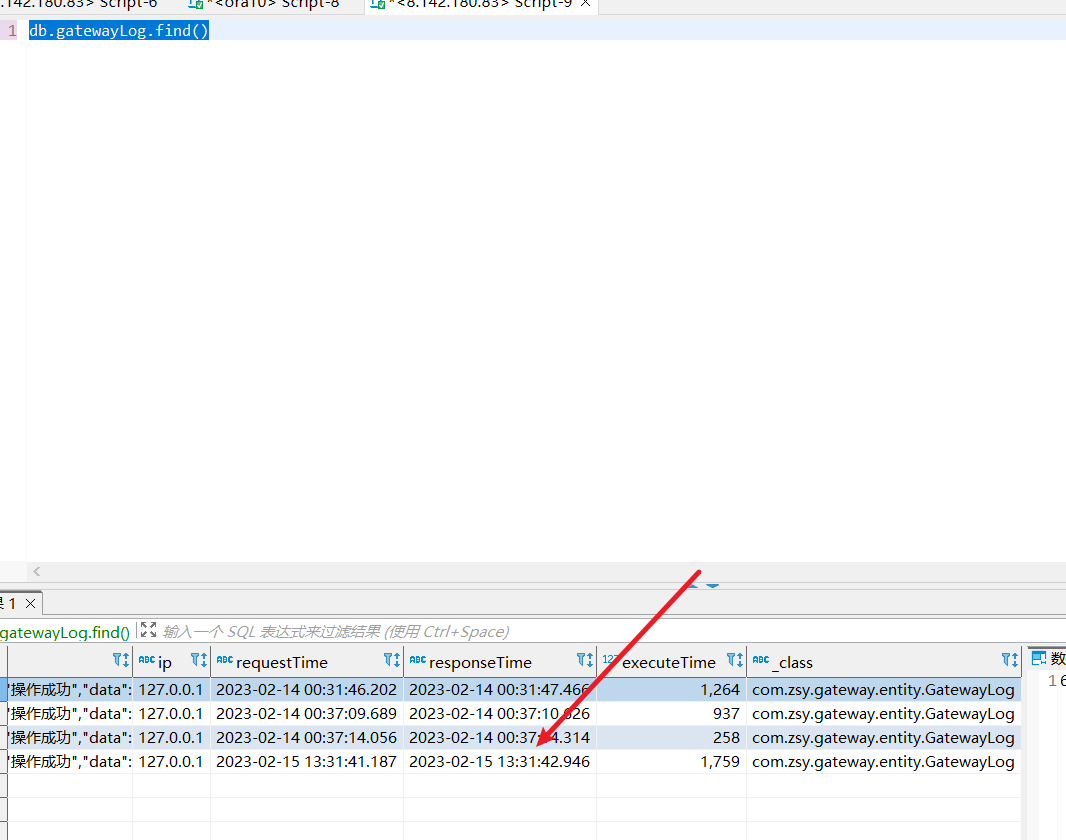
可以看到响应成功了,接下来我们就确认一下mongoDb中是否有存储网关请求响应信息
{"status":100,"message":"操作成功","data":{"id":1,"accountCode":"zsy","accountName":"zsy","amount":10000.00},"success":true,"timestamp":1676439102837}
2
3
通过数据库连接工具查询,可以看到网关请求响应日志也成功存储到MongoDB中。
# 参考文献
SpringCloud Alibaba微服务实战二十四 - SpringCloud Gateway的全局异常处理 (opens new window)
软件开发设计中的上游与下游 (opens new window)
SpringCloud Alibaba实战二十九 | SpringCloud Gateway 请求响应日志 (opens new window)
MongoDB 数据查询操作 (opens new window)
