
 聊聊Java中的异常
# 写在文章开头
日常程序开发不是在定位异常就是在解决异常的路上,对于java中的异常的了解有助于我们编写出见状的程序,所以本文将基于笔者过去的稿件对异常这个知识点进行整理,希望对你有帮助。
Hi,我是 sharkChili ,是个不断在硬核技术上作死的技术人,是 CSDN的博客专家 ,也是开源项目 Java Guide 的维护者之一,熟悉 Java 也会一点 Go ,偶尔也会在 C源码 边缘徘徊。写过很多有意思的技术博客,也还在研究并输出技术的路上,希望我的文章对你有帮助,非常欢迎你关注我的公众号: 写代码的SharkChili 。
同时也非常欢迎你star我的开源项目mini-redis:https://github.com/shark-ctrl/mini-redis (opens new window)
因为近期收到很多读者的私信,所以也专门创建了一个交流群,感兴趣的读者可以通过上方的公众号获取笔者的联系方式完成好友添加,点击备注 “加群” 即可和笔者和笔者的朋友们进行深入交流。

# 详解java异常核心知识点
# 什么是异常
针对java的异常,我们认为大致分为以下2种情况:
- 程序运行逻辑输出结果不符合预期要求。
- 程序执行时过程中因为处理不当或者资源不可用抛出
Exception。
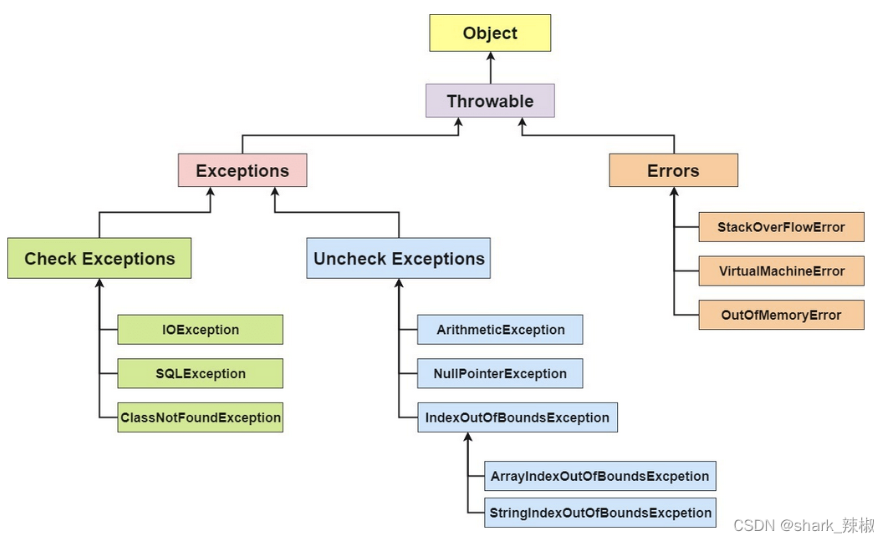
引用guide哥的图片,Java异常类体系结构如下图所示,整体来说分为三大类:
check excetions:一些三方包方法签名上常会打上这些异常,告知用户可能存在这些异常需要提起预埋一下逻辑处理。uncheck exceptions:一些运行时可能出现的异常,但用户无需提前预埋处理。errors:一些比较严重的异常,它表示合理的应用程序不应尝试捕获的严重问题。
# Exception和Error有什么区别
Exception或者Exception自类的异常对象是可以进行捕获和处理的,例如下面这段算术异常,我们就可以手动捕获并打印处理掉:
 try {
            for (int i = 0; i < 30_0000; i++) {

                int num = 10 / 0;
                System.out.println("Fnum:" + num);
            }

        } catch (Exception e) {
            System.out.println("outerTryCatch 报错");
        }
2
3
4
5
6
7
8
9
10
Exception包含受检异常和非受检异常,他们区别是:
- 受检异常的方法在调用时需要抛出的潜在风险进行处理,要么捕获,要么向上抛。
- 非受检异常即运行时才可能知晓的异常,该异常可由开发人员结合业务场景确定是否捕获。
关于受检异常和非受检异常我们后文给出示例。
这种错误一般都是OOM、Java虚拟机运行错误(Virtual MachineError)、或者类定义错误(NoClassDefFoundError),基本都是服务崩溃,是正常的程序不应该出现的问题,我们必须完成定位并进行修复解决。
# 受检异常和非受检异常的区别
受检异常一般在调用时,用户就需要对其进行处理,如果不处理则不会通过编译,这些问题一般会出现在某些需要引用外部资源或者是三方包中的方法。例如FileInputStream,如果我们没有对其构造方法抛出的错误(即受检异常)进行处理,我们是无法通过编译的。
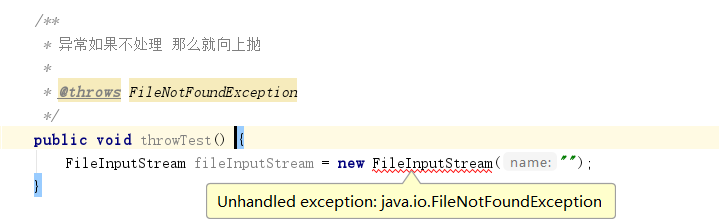
查看该构造方法定义,可以FileInputStream受检的异常FileNotFoundException已经定义在方法签名上。
public FileInputStream(String name) throws FileNotFoundException {
        this(name != null ? new File(name) : null);
    }
2
3
非受检异常一般是运行时异常,常见的有空指针异常、非法参数异常、算数异常、数组越界等,这类异常可以按需进行捕获处理。例如下面这段代码就会抛出算术异常,我们即使没有使用try代码块,代码也能通过编译并运行(直到报错)。
 int num = 10 / 0;
System.out.println("Fnum:" + num);
2
# throw与throws的区别
它们唯一的区别就在定义的位置:
throws放在函数上,throw放在函数内。throws可以跟多个错误类,throw只能跟单个异常对象
# 异常常用方法和使用示例
getMessage方法返回异常的错误的简要信息,它不会打印异常堆栈,只是打印异常的原因,例如这段代码,它的打印结果就是/ by zero,并不会输出运行报错的具体调用堆栈信息。
try {
            for (int i = 0; i < 30_0000; i++) {

                int num = 10 / 0;
                System.out.println("Fnum:" + num);
            }

        } catch (Exception e) {
            System.out.println(e.getMessage());
        }
2
3
4
5
6
7
8
9
10
我们在catch模块调用异常类的toString方法,它会返回异常发生时的异常信息,同样不会打印堆栈结果,所以对于只需要看到异常信息的话,可以使用toString。
catch (Exception e) {
            System.out.println(e.toString());
        }
2
3
输出结果:
java.lang.ArithmeticException: / by zero
getLocalizedMessage返回异常本地化信息。
catch (Exception e) {
            System.out.println(e.getLocalizedMessage());
        }
2
3
输出结果:
/ by zero
printStackTrace在控制台上打印堆栈追踪信息,我们可以详细看到异常的调用堆栈信息和错误原因。
 catch (Exception e) {
           e.printStackTrace();
        }
2
3
输出结果:
java.lang.ArithmeticException: / by zero
	at com.sharkChili.base.Main.outerTryCatch(Main.java:17)
	at com.sharkChili.base.Main.main(Main.java:7)
2
3
# 受检异常使用示例
我们自定义一个受检异常
public class ArithmeticException extends Exception {
    @Override
    public String getMessage() {
        return "自定义算术异常";
    }
}
2
3
4
5
6
编写一个除法的函数:
private int calculate(int  number,int divNum) throws ArithmeticException {
        if (divNum==0){
            throw new ArithmeticException();
        }
        return number / divNum;
    }
2
3
4
5
6
测试代码如下,因为是受检异常,所以运行时需要手动捕获处理一下。
        int number=20;
        try {
            int result = calculate(number,0);
            System.out.println(result);
        } catch (ArithmeticException e) {
            logger.error("calculateTest计算失败,请求参数:[{}],错误原因[{}]",number,e.getMessage(),e);
        }
2
3
4
5
6
7
8
输出结果:
[main] ERROR com.guide.exception.ExceptionTest - calculateTest计算失败,请求参数:[20],错误原因[自定义算术异常]
# try-catch运行原理
try-catch感知和捕获异常的工作过程如下:
try块代码执行报错若有catch模块catch则会对其进行捕获处理。- 根据捕获到的异常创建一个异常对象。
- 用户根据这个异常对象进行进一步处理。
例如我们上文捕获了ArithmeticException ,那么catch (ArithmeticException e) 实质上会做一个Exception e = new ArithmeticException()的动作,进而按照用户的想法进行错误捕获逻辑处理。
# 异常使用注意事项
# 多异常捕获处理技巧
对于多异常需要捕获处理时,我们建议符合以下三大原则:
- 有几个异常就处理几个异常,如果无法处理就抛出。
- 父类
exception放在最下方。 - 多异常建议使用
|进行归类整理。
如下所示,我们自定义一个自定义错误函数
private int calculate(int  number,int divNum) throws ArithmeticException,FileNotFoundException, UnknownHostException, IOException {
        if (divNum==0){
            throw new ArithmeticException();
        }
        return number / divNum;
    }
2
3
4
5
6
假定UnknownHostException 是用户配置问题,我们无法处理,那么就抛出,其他错误一一捕获,所以我们的代码可能是这样。
        int number=20;

        int result = 0;
        try {
            result = calculate(number,0);
        } catch (ArithmeticException e) {
            e.printStackTrace();
        } catch (FileNotFoundException e){

        }catch (IOException e) {
            e.printStackTrace();
        }
        System.out.println(result);
2
3
4
5
6
7
8
9
10
11
12
13
14
15
16
实际在为了让代码更加整洁高效。生成的catch块也只是一个公共的代码块,所以我们最终的代码应该是下面这个样子
        int number=20;

        int result = 0;
        try {
            result = calculate(number,0);
        } catch (ArithmeticException|FileNotFoundException e) {
            logger.error("calculateTest执行报错,用户执行出错或者文件数据获取失败,请求参数[{}],错误信息[{}]",number,e.getMessage(),e);
        } catch (IOException e) {
            logger.error("calculateTest执行报错,文件操作异常,请求参数[{}],错误信息[{}]",number,e.getMessage(),e);
        }catch (Exception e){
            logger.error("calculateTest执行报错,请求参数[{}],错误信息[{}]",number,e.getMessage(),e);

        }
        System.out.println(result);
2
3
4
5
6
7
8
9
10
11
12
13
14
15
16
17
18
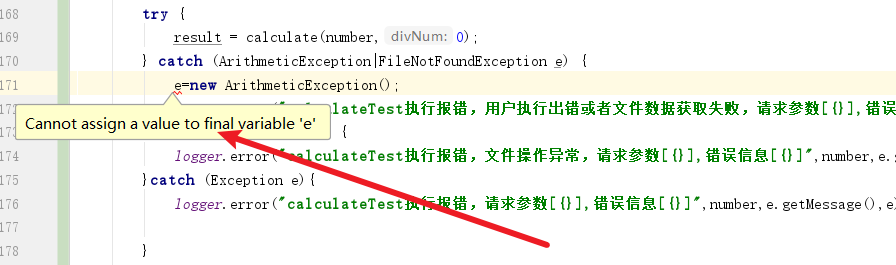
注意,使用|运算符之后e会变为final变量,用户无法改变引用的指向(这个似乎对我们没有说明影响)。
# 特殊的异常对象 RuntimeException
使用runtime异常类时,在函数内throw则函数上不用throws,编译可以正常通过。如下代码,即使没有throws ArithmeticException(ArithmeticException为runtime的子类),编译照样通过,代码可以正常运行,直到报错。
class Demo{
	int div(int a,int b)throws Exception//throws ArithmeticException{

		if(b<0)
			throw new Exception("出现了除数为负数了");
		if(b==0)
			throw new ArithmeticException("被零除啦");
		return a/b;
	}
}
2
3
4
5
6
7
8
9
10
RuntimeException可以编译通过且不用捕获的原因也很简单,设计者认为运行时异常是特定情况下运行时错误,是否处理需要让开发人员自行判断。
# 详解finally关键字
finally无论异常是否执行,在try块结束后必定会运行的,需要注意的是如果程序出现异常,finally中有return语句的话,catch块的return将没有任何作用,代码如下所示:
public static int func() {
        try {
            int i = 1 / 0;
        } catch (Exception e) {
            return 2;
        } finally {
            return 1;
        }
    }
2
3
4
5
6
7
8
9
# 使用场景
finally最常用于资源释放:
//读取文本文件的内容
        Scanner scanner = null;
        try {
            scanner = new Scanner(new File("D://read.txt"));
            while (scanner.hasNext()) {
                System.out.println(scanner.nextLine());
            }
        } catch (FileNotFoundException e) {
            e.printStackTrace();
        } finally {
            if (scanner != null) {
                scanner.close();
            }
        }
2
3
4
5
6
7
8
9
10
11
12
13
14
补充一句,对于资源释放,我们现在更简易使用try-with-resources代码简洁易读。上述那段关闭流的代码十分冗长,可读性十分差劲,对于继承Closeable、AutoCloseable的类都可以使用以下语法完成资源加载和释放
 try (Scanner scanner = new Scanner(new File("D://read.txt"))) {
            while (scanner.hasNext()) {
                System.out.println(scanner.nextLine());
            }
        } catch (FileNotFoundException e) {
            e.printStackTrace();
        }
2
3
4
5
6
7
# finally 中的代码一定会执行吗
不一定,如下代码所示,当虚拟机执行退出的话,finally是不会被执行的:
@Test
    public void finallyNoRun() {
        try {
            System.out.println("try code run.....");
            //虚拟机退出运行
            System.exit(0);
        } catch (Exception e) {
            e.printStackTrace();
        } finally {
            System.out.println("finally run...");
        }


    }
2
3
4
5
6
7
8
9
10
11
12
13
14
输出结果如下,可以看到finally方法并没有被运行到。
try code run.....
# 异常使用注意事项
# 不要在finnally中使用return
函数执行的try块返回值会被缓存的本地变量中,当finally进行return操作就会覆盖这个本地变量。
    public void finallyReturnTest() {
        System.out.println(finallyReturnFun());

    }

    private String finallyReturnFun() {
        try {
            int ten = 10;
            return "tryRetunVal";
        } catch (Exception e) {
            System.out.println("报错了。。。。");
        } finally {
            return "finallyReturnVal";
        }

    }
2
3
4
5
6
7
8
9
10
11
12
13
14
15
16
17
输出结果为finallyReturnVal,因为finally优先于try块中的代码,当finally进行return操作就会覆盖这个本地变量。
finallyReturnVal
2
3
# 异常不处理就抛出
捕获异常是为了处理它,不要捕获了却什么都不处理而抛弃之,如果不想处理它,请 将该异常抛给它的调用者。最外层的业务使用者,必须处理异常,将其转化为用户可以理解的内容。
自定义一个异常
public class MyIllegalArgumentException extends Exception {

    public MyIllegalArgumentException(String msg) {
        super(msg);
    }

    @Override
    public String getMessage() {
        return super.getMessage();
    }
}
2
3
4
5
6
7
8
9
10
11
测试代码
    public void checkTest() {
        String param = null;
        try {
            check(null);
        } catch (MyIllegalArgumentException e) {

            logger.info("参数校验异常,请求参数[{}],错误信息[{}]", param, e.getMessage(), e);

        }
    }


    private void check(String str) throws MyIllegalArgumentException {
        if (str == null || str.length() <= 0) {
            throw new MyIllegalArgumentException("字符串不可为空");
        }
    }
2
3
4
5
6
7
8
9
10
11
12
13
14
15
16
17
18
输出结果:
[main] INFO com.guide.exception.ExceptionTest - 参数校验异常,请求参数[null],错误信息[字符串不可为空]
# 不要用异常控制流程
不要使用try块语句控制业务执行流程,原因如下:
try-catch阻止JVM试图进行的优化,所以当我们要使用try块时,使用的粒度尽可能要小一些。- 现代标准遍历模式并不会导致冗余检查,所以我们无需为了避免越界检查而使用
try块解决问题。
错误示例,不仅可读性差,而且性能不佳。
public static void stackPopByCatch() {
        long start = System.currentTimeMillis();
        try {
            //插入1000w个元素
            Stack stack = new Stack();
            for (int i = 0; i < 1000_0000; i++) {
                stack.push(i);
            }


            //使用pop抛出的异常判断出栈是否结束
            while (true) {
                try {
                    stack.pop();
                } catch (Exception e) {
                    System.out.println("出栈结束");
                    break;
                }
            }
        } catch (Exception e) {

        }


        long end = System.currentTimeMillis();
        System.out.println("使用try进行异常捕获,执行时间:" + (end - start));


        start = System.currentTimeMillis();
        Stack stack2 = new Stack();
        for (int i = 0; i < 1000_0000; i++) {
            stack2.push(i);

        }

        //使用for循环控制代码流程
        int size = stack2.size();

        for (int i = 0; i < size; i++) {
            stack2.pop();
        }
        end = System.currentTimeMillis();
        System.out.println("使用逻辑进行出栈操作,执行时间:" + (end - start));
    }
2
3
4
5
6
7
8
9
10
11
12
13
14
15
16
17
18
19
20
21
22
23
24
25
26
27
28
29
30
31
32
33
34
35
36
37
38
39
40
41
42
43
44
输出结果,可以看到用try块控制业务流程性能很差:
出栈结束
使用try进行异常捕获,执行时间:2613
使用逻辑进行出栈操作,执行时间:1481
2
3
# 规范异常日志打印
- 不要使用
JSON工具,因为某些get方法可能会抛出异常。 - 记录参数,错误信息,堆栈信息。
    public void logShowTest() {
        Map inputParam = new JSONObject().fluentPut("key", "value");
        try {
            logShow(inputParam);
        } catch (ArithmeticException e) {
            logger.error("inputParam:{} ,errorMessage:{}", inputParam.toString(), e.getMessage(), e);

        }
    }


    private int logShow(Map inputParam) throws ArithmeticException {
        int zero = 0;
        if (zero==0){
           throw new ArithmeticException();
        }
        return 19 / zero;
    }
2
3
4
5
6
7
8
9
10
11
12
13
14
15
16
17
18
19
输出结果:
[main] ERROR com.guide.exception.ExceptionTest - inputParam:{"key":"value"} ,errorMessage:自定义算术异常
com.guide.exception.ArithmeticException: 自定义算术异常
	at com.guide.exception.ExceptionTest.logShow(ExceptionTest.java:166)
2
3
4
5
# 避免频繁抛出和捕获异常
如下代码所示,可以看到频繁抛出和捕获对象是非常耗时的,所以我们不建议使用异常来作为处理逻辑,我们完全可以和前端协商好错误码从而避免没必要的性能开销
private int testTimes;

    public ExceptionTest(int testTimes) {
        this.testTimes = testTimes;
    }

    public void newObject() {
        long l = System.currentTimeMillis();
        for (int i = 0; i < testTimes; i++) {
            new Object();
        }
        System.out.println("建立对象:" + (System.currentTimeMillis() - l));
    }

    public void newException() {
        long l = System.currentTimeMillis();
        for (int i = 0; i < testTimes; i++) {
            new Exception();
        }
        System.out.println("建立异常对象:" + (System.currentTimeMillis() - l));
    }

    public void catchException() {
        long l = System.currentTimeMillis();
        for (int i = 0; i < testTimes; i++) {
            try {
                throw new Exception();
            } catch (Exception e) {
            }
        }
        System.out.println("建立、抛出并接住异常对象:" + (System.currentTimeMillis() - l));
    }

    public void catchObj() {
        long l = System.currentTimeMillis();
        for (int i = 0; i < testTimes; i++) {
            try {
                new Object();
            } catch (Exception e) {
            }
        }
        System.out.println("建立,普通对象并catch:" + (System.currentTimeMillis() - l));
    }

    public static void main(String[] args) {
        ExceptionTest test = new ExceptionTest(100_0000);
        test.newObject();
        test.newException();
        test.catchException();
        test.catchObj();

    }
2
3
4
5
6
7
8
9
10
11
12
13
14
15
16
17
18
19
20
21
22
23
24
25
26
27
28
29
30
31
32
33
34
35
36
37
38
39
40
41
42
43
44
45
46
47
48
49
50
51
52
输出结果:
输出结果
建立对象:3
建立异常对象:484
建立、抛出并接住异常对象:539
建立,普通对象并catch:3
2
3
4
5
6
7
# 尽可能在for循环外捕获异常
上文提到try-catch时会捕获并创建异常对象,所以如果在for循环内频繁捕获异常会创建大量的异常对象:
public static void main(String[] args) {
        outerTryCatch();
        innerTryCatch();

    }

	//for 外部捕获异常
    private static void outerTryCatch() {
        long memory = Runtime.getRuntime().freeMemory();
        try {
            for (int i = 0; i < 30_0000; i++) {

                int num = 10 / 0;
                System.out.println("Fnum:" + num);
            }

        } catch (Exception e) {
        }
        long useMemory = (memory - Runtime.getRuntime().freeMemory()) / 1024 / 1024;

        System.out.println("cost memory:" + useMemory + "M");
    }

	//for 内部捕获异常
    private static void innerTryCatch() {
        long memory = Runtime.getRuntime().freeMemory();

        for (int i = 0; i < 30_0000; i++) {
            try {
                int num = 10 / 0;
                System.out.println("num:" + num);
            } catch (Exception e) {
            }
        }
        long useMemory = (memory - Runtime.getRuntime().freeMemory()) / 1024 / 1024;

        System.out.println("cost memory:" + useMemory + "M");
    }
2
3
4
5
6
7
8
9
10
11
12
13
14
15
16
17
18
19
20
21
22
23
24
25
26
27
28
29
30
31
32
33
34
35
36
37
38
输出结果如下,可以看到for循环内部捕获异常消耗了22M的堆内存。原因很简单,for外部捕获异常时,会直接终止for循环,而在for循环内部捕获异常仅结束本次循环的,所以如果for循环频繁报错,那么在内部捕获异常尽可能创建大量的异常对象。
cost memory:0M
cost memory:22M
2
# 常见面试题
# 为什么不建议使用异常控制业务流程
《Effective java》作者提出,创建异常并抛出处理是一件代价是非常昂贵的,因为它涉及到填充堆栈跟踪信息、创建异常对象、异常捕获等操作。- 异常的指着用于处理非正常情况而非业务流程处理。
# ClassNotFoundException和NoClassDefFoundError的区别是什么
ClassNotFoundException是受检异常,通常在运行时加载类找不到指定类时触发,最最典型的就是加载jdbc驱动的Class.forName("com.mysql.cj.jdbc.Driver")方法调用。NoClassDefFoundError指代一个错误,表示运行时加载一个类定义时虽然找到类文件,但是加载或者解析、链接类的过程中发生问题,也就说明这个错误是在编译或者运行时丢失。最经典的例子就是某个某个代码编译时存在,运行时这个某个class文件丢失就会导致该问题。
# Java中异常中的受检异常和非受检异常有什么区别?
- 受检异常:用户必须显示处理其中的错误,否则无法编译通过,它更强调调用者明确处理一些特殊情况。
- 非受检异常:也就是运行时异常不需要用户提前去明确处理的异常,这种异常一般可以理解为代码原因导致的,可能会发生也可能不会发生,所以我们就不需要去特殊的处理。
# 小结
我是 sharkchili ,CSDN Java 领域博客专家,mini-redis的作者,我想写一些有意思的东西,希望对你有帮助,如果你想实时收到我写的硬核的文章也欢迎你关注我的公众号: 写代码的SharkChili 。
同时也非常欢迎你star我的开源项目mini-redis:https://github.com/shark-ctrl/mini-redis (opens new window)
因为近期收到很多读者的私信,所以也专门创建了一个交流群,感兴趣的读者可以通过上方的公众号获取笔者的联系方式完成好友添加,点击备注 “加群” 即可和笔者和笔者的朋友们进行深入交流。

# 参考文献
Java基础常见面试题总结(下):https://javaguide.cn/java/basis/java-basic-questions-03.html#项目相关 (opens new window)
Effective Java中文版(第3版):https://book.douban.com/subject/30412517/ (opens new window)
阿里巴巴Java开发手册:https://book.douban.com/subject/27605355/ (opens new window)
Java核心技术·卷 I(原书第11版):https://book.douban.com/subject/34898994/ (opens new window)
Java 基础 - 异常机制详解:https://www.pdai.tech/md/java/basic/java-basic-x-exception.html#异常是否耗时为什么会耗时 (opens new window)
面试官问我 ,try catch 应该在 for 循环里面还是外面?:https://mp.weixin.qq.com/s/TQgBSYAhs_kUaScw7occDg (opens new window)
