
 Java常用集合类HashMap深度解析
# 写在文章开头
在Java编程中,HashMap 是最常用的数据结构之一,它提供了高效的键值对存储和检索功能。无论是日常开发还是技术面试,对 HashMap 的深入理解和熟练应用都是至关重要的。
Hi,我是 sharkChili ,是个不断在硬核技术上作死的技术人,是 CSDN的博客专家 ,也是开源项目 Java Guide 的维护者之一,熟悉 Java 也会一点 Go ,偶尔也会在 C源码 边缘徘徊。写过很多有意思的技术博客,也还在研究并输出技术的路上,希望我的文章对你有帮助,非常欢迎你关注我的公众号: 写代码的SharkChili 。
同时也非常欢迎你star我的开源项目mini-redis:https://github.com/shark-ctrl/mini-redis (opens new window)
因为近期收到很多读者的私信,所以也专门创建了一个交流群,感兴趣的读者可以通过上方的公众号获取笔者的联系方式完成好友添加,点击备注 “加群” 即可和笔者和笔者的朋友们进行深入交流。
# HashMap数据结构概览
HashMap是我们比较常用的集合类型,它是以键值对的逻辑结构来存储数据的。
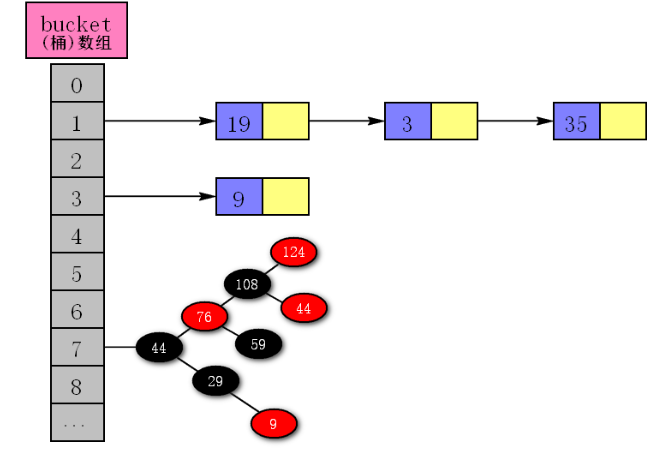
HashMap允许存储null键或者null值的键值对。HashMap非线程安全。HashMap底层初始化用的是数组+链表,当链表长度大于8(默认值)时,若size小于64则进行2倍扩容,反之会对对应的数组桶进行链表转红黑树操作。HashMap默认容量大小为16。
# 不同版本的HashMap底层数据结构
在JDK1.8 之前,底层采用数组+链表,用(n - 1) & hash找到数组索引位置,若冲突则用拉链法解决冲突,当冲突碰撞加剧的时候,可能存在查询性能退化为O(n)的情况。
JDK1.8 之后底层采用数组+链表作为初始结构,当某个桶链表长度大于8时,默认情况下,会判断数组长度是否小于64,若小于64则使用resize()进行扩容。反之调用treeifyBin()将bucket内所有节点转红黑树节点:
final V putVal(int hash, K key, V value, boolean onlyIfAbsent,
                   boolean evict) {
        Node<K,V>[] tab; Node<K,V> p; int n, i;
       //......
            else {
                for (int binCount = 0; ; ++binCount) {
                    if ((e = p.next) == null) {
                        p.next = newNode(hash, key, value, null);
                        //当链表元素大于8时,调用treeifyBin查看当前bucket数是否大于64,若大于则将bucket节点转红黑树节点,反之进行bucket扩容
                        if (binCount >= TREEIFY_THRESHOLD - 1) // -1 for 1st
                            treeifyBin(tab, hash);
                        break;
                    }
                    //......
                }
            }
            //......
        }
       //......
        return null;
    }
2
3
4
5
6
7
8
9
10
11
12
13
14
15
16
17
18
19
20
21
# HashMap是如何解决哈希冲突的?
在JDK7之前HashMap采用的是链式寻址法解决哈希冲突的,而JDK8之后则未转红黑树前采用的就是链式寻址法,转红黑树之后就借用红黑树天然有序性(黑平衡)解决哈希冲突。
# 为什么1.8之后要加一个链表转红黑树的操作
链表查询的时间复杂度为O(n)在数据量较少的情况下查询效率不错,一旦冲突非常厉害,链表数量暴增的话查询效率或者添加效率都会十分低下,所以就需要转为红黑树,通过黑平衡结构保证插入和查询效率都为O(logN),并且红黑树是黑平衡树,所以相较于AVL不会进行频繁的翻转保证平衡的操作。
# HashMap底层的数据结构红黑树算法在大数据情况下最大高度可能是多少呢?
理想情况为2log2 (n+1),但是Java中这个情况考虑的因素就很多了:
- 得看看堆区大小以及这个节点的大小。
- 就
Java而言这种情况很少见,如果大数据都在一个bucket中,就说明设置的哈希算法有问题了。
# HashMap几种构造方法
# 默认构造函数的初始化流程
如下所示,仅仅初始化负载因子,默认为0.75f,这个负载因子的作用即当当前数组大小>数组容量*负载因子时会进行扩容操作。
public HashMap() {
        this.loadFactor = 0.75F;
    }
2
3
# 将另一个Map存到当前Map中的构造函数工作流程
该方法会将阈值设置为默认值DEFAULT_LOAD_FACTOR(0.75f),然后将传入的map通过putMapEntries方法将键值对逐个存入。
public HashMap(Map<? extends K, ? extends V> m) {
        this.loadFactor = DEFAULT_LOAD_FACTOR;
        putMapEntries(m, false);
    }
2
3
4
# 指定初始化容量的HashMap
通过外部参数传入initialCapacity,初始化map底层数据的大小。
public HashMap(int initialCapacity) {
         this(initialCapacity, DEFAULT_LOAD_FACTOR);
     }
2
3
4
5
# 指定容量和负载因子的构造函数
public HashMap(int initialCapacity, float loadFactor) {
         if (initialCapacity < 0)
             throw new IllegalArgumentException("Illegal initial capacity: " + initialCapacity);
         if (initialCapacity > MAXIMUM_CAPACITY)
             initialCapacity = MAXIMUM_CAPACITY;
         if (loadFactor <= 0 || Float.isNaN(loadFactor))
             throw new IllegalArgumentException("Illegal load factor: " + loadFactor);
         this.loadFactor = loadFactor;
         this.threshold = tableSizeFor(initialCapacity);
     }
2
3
4
5
6
7
8
9
10
# HashMap核心源码详解
# HashMap对应put方法工作流程
HashMap的put方法的逻辑比较清晰,大体的逻辑为:
- 通过
hash算法得到桶的位置 - 尝试将键值对存到
hash计算后的桶的位置中。 - 无冲突直接创建新节点保存。
- 有冲突则按照链表或者红黑树的逻辑进行插入。
入口代码
public V put(K key, V value) {
    return putVal(hash(key), key, value, false, true);
}
2
3
进入putVal,可以看到要做的就是计算出桶的位置然后完成插入。
final V putVal(int hash, K key, V value, boolean onlyIfAbsent,
                   boolean evict) {
    Node<K,V>[] tab; Node<K,V> p; int n, i;
    // table未初始化或者长度为0,进行扩容
    if ((tab = table) == null || (n = tab.length) == 0)
        n = (tab = resize()).length;

    //计算(n - 1) & hash并查看是否在桶中,若不在则直接创建一个结点放到这个桶中
    if ((p = tab[i = (n - 1) & hash]) == null)
        tab[i] = newNode(hash, key, value, null);

    // 桶中已经存在元素(处理hash冲突)
    else {
        Node<K,V> e; K k;
        // 判断table[i]中的元素是否与插入的key一样,若相同那就直接使用插入的值p替换掉旧的值e。
        if (p.hash == hash &&
            ((k = p.key) == key || (key != null && key.equals(k))))
                e = p;

        // 判断插入的是否是红黑树节点
        else if (p instanceof TreeNode)
            // 放入树中
            e = ((TreeNode<K,V>)p).putTreeVal(this, tab, hash, key, value);

        // 不是红黑树节点则说明为链表结点
        else {
            // 不断遍历到达链表尾部
            for (int binCount = 0; ; ++binCount) {
                // 不断往链表后面走,若为空则说明到达尾部,直接添加节点
                if ((e = p.next) == null) {

                    p.next = newNode(hash, key, value, null);
                    // 结点数量达到阈值(默认为 8 ),执行 treeifyBin 方法
                    // 这个方法会根据 HashMap 数组来决定是否转换为红黑树。
                    // 只有当数组长度大于或者等于 64 的情况下,才会执行转换红黑树操作,以减少搜索时间。否则,就是只是对数组扩容。
                    if (binCount >= TREEIFY_THRESHOLD - 1) // -1 for 1st
                        treeifyBin(tab, hash);
                    // 跳出循环
                    break;
                }
                // 判断链表中结点的key值与插入的元素的key值是否相等
                if (e.hash == hash &&
                    ((k = e.key) == key || (key != null && key.equals(k))))
                    // 相等,跳出循环
                    break;
                // 用于遍历桶中的链表,与前面的e = p.next组合,可以遍历链表
                p = e;
            }
        }
        // 表示在桶中找到key值、hash值与插入元素相等的结点
        if (e != null) {
            // 记录e的value
            V oldValue = e.value;
            // onlyIfAbsent为false或者旧值为null
            if (!onlyIfAbsent || oldValue == null)
                //用新值替换旧值
                e.value = value;
            // 访问后回调
            afterNodeAccess(e);
            // 返回旧值
            return oldValue;
        }
    }
    // 结构性修改
    ++modCount;
    // 实际大小大于阈值则扩容
    if (++size > threshold)
        resize();
    // 插入后回调
    afterNodeInsertion(evict);
    return null;
}
2
3
4
5
6
7
8
9
10
11
12
13
14
15
16
17
18
19
20
21
22
23
24
25
26
27
28
29
30
31
32
33
34
35
36
37
38
39
40
41
42
43
44
45
46
47
48
49
50
51
52
53
54
55
56
57
58
59
60
61
62
63
64
65
66
67
68
69
70
71
72
73
74
75
# HashMap的get方法的流程
整体逻辑和put也差不多,计算桶的位置,然后看看是那种数据结构,若是链表则遍历链表然后进行hashCode和equals方法比较是否一致然后返回,红黑树同理。
public V get(Object key) {
    Node<K,V> e;
    return (e = getNode(hash(key), key)) == null ? null : e.value;
}


final Node<K,V> getNode(int hash, Object key) {
    Node<K,V>[] tab; Node<K,V> first, e; int n; K k;
    if ((tab = table) != null && (n = tab.length) > 0 &&
        (first = tab[(n - 1) & hash]) != null) {
        // 数组元素相等
        if (first.hash == hash && // always check first node
            ((k = first.key) == key || (key != null && key.equals(k))))
            return first;
        // 桶中不止一个节点
        if ((e = first.next) != null) {

            // 若是红黑树,则走红黑树的遍历逻辑
            if (first instanceof TreeNode)
                return ((TreeNode<K,V>)first).getTreeNode(hash, key);

            // 反之说明这是一个链表
            do {
                if (e.hash == hash &&
                    ((k = e.key) == key || (key != null && key.equals(k))))
                    return e;
            } while ((e = e.next) != null);
        }
    }
    return null;
}
2
3
4
5
6
7
8
9
10
11
12
13
14
15
16
17
18
19
20
21
22
23
24
25
26
27
28
29
30
31
32
33
# hashMap扩容机制
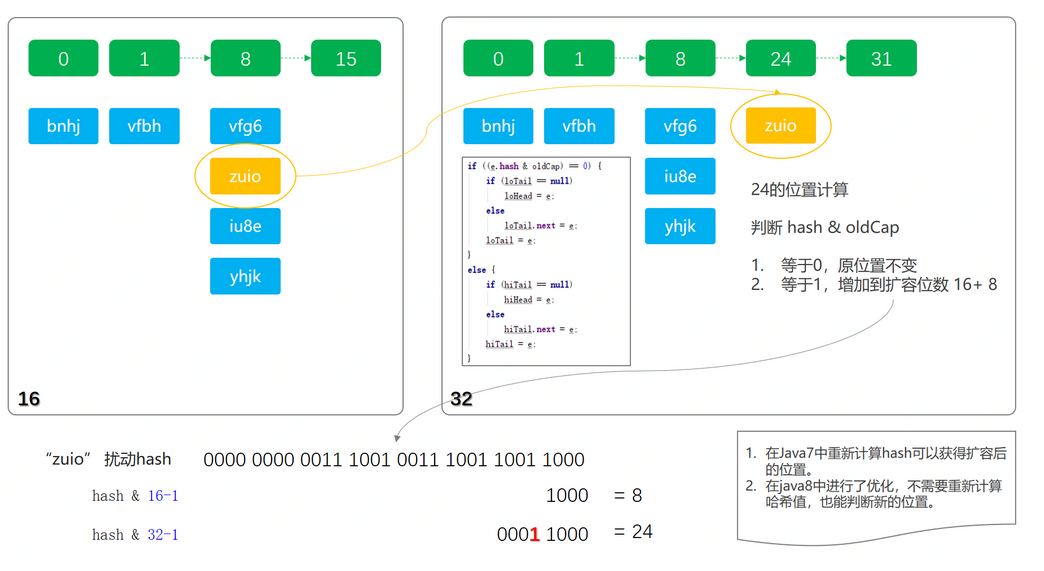
扩容方法整体做的就是数组迁移,注释都在下方,这里我们只需注意JDK核心设计,就是迁移的核心逻辑代码如下。
是JDK1.8中的优化操作,可以不需要再重新计算每一个元素的哈希值,如下图所示,将当前元素的hash值&容器旧的容量,如果高位有1则说明他要落到新的bucket中。
final Node<K,V>[] resize() {
        Node<K,V>[] oldTab = table;
        int oldCap = (oldTab == null) ? 0 : oldTab.length;
        int oldThr = threshold;
        int newCap, newThr = 0;

		// 计算扩容的容量以及新的阈值
        if (oldCap > 0) {
            if (oldCap >= MAXIMUM_CAPACITY) {
                threshold = Integer.MAX_VALUE;
                return oldTab;
            }
            else if ((newCap = oldCap << 1) < MAXIMUM_CAPACITY &&
                     oldCap >= DEFAULT_INITIAL_CAPACITY)
                newThr = oldThr << 1; // double threshold
        }
        else if (oldThr > 0) // initial capacity was placed in threshold
            newCap = oldThr;
        else {               // zero initial threshold signifies using defaults
            newCap = DEFAULT_INITIAL_CAPACITY;
            newThr = (int)(DEFAULT_LOAD_FACTOR * DEFAULT_INITIAL_CAPACITY);
        }
        if (newThr == 0) {
            float ft = (float)newCap * loadFactor;
            newThr = (newCap < MAXIMUM_CAPACITY && ft < (float)MAXIMUM_CAPACITY ?
                      (int)ft : Integer.MAX_VALUE);
        }
        threshold = newThr;
        @SuppressWarnings({"rawtypes","unchecked"})
        Node<K,V>[] newTab = (Node<K,V>[])new Node[newCap];
        table = newTab;
        if (oldTab != null) {
            for (int j = 0; j < oldCap; ++j) {
        				//遍历,将旧链表元素迁移到新的链表上
                        } while ((e = next) != null);
                        //维护原来的尾节点
                        if (loTail != null) {
                            loTail.next = null;
                            newTab[j] = loHead;
                        }
                        // 维护新扩容的尾节点
                        if (hiTail != null) {
                            hiTail.next = null;
                            newTab[j + oldCap] = hiHead;
                        }
                    }
                }
            }
        }
        return newTab;
    }
2
3
4
5
6
7
8
9
10
11
12
13
14
15
16
17
18
19
20
21
22
23
24
25
26
27
28
29
30
31
32
33
34
35
36
37
38
39
40
41
42
43
44
45
46
47
48
49
50
51
# HashMap 的容量为什么需要是 2 的幂次方,而这个幂为什么是31呢?
先来回答第一个问题,容量为什么是2的幂次方,首先我们步入hashMap的源码中查看。hashMap计算键值对存到桶中索引位置的代码。
i = (n - 1) & hash
在n为2的次幂情况下,(n - 1) & hash通过数学公式其实可以推导为 hash%n。
我们假设hash为1,使用不同的2次幂可以印证我们上面的论述。
1. n为2的2次方:  4===> 3&1==1%4
2. n为2的3次方:  8===> 7&1==1%8
3. .....
2
3
除此之外,使用2的次幂进行计算时碰撞次数会少于非2的次幂。同样的,我们假设hash值的7、8、9、10。hashMap的容量n分别假设为8(2的3次方)和9。
n为16的计算结果如下,碰撞0次。
7===>7
8===>0
9===>1
10===>2
2
3
4
n为9的计算结果,碰撞2次。
7===>0
8===>8
9===>8
10===>8
2
3
4
再来了解一下hashCode的东西可以看到计算机hash的乘积数写死为31,这是为什么呢?
int hash = 0;
    private char[] value;

    public int hashCode() {

        int h = hash;
        if (h == 0 && value.length > 0) {
            char val[] = value;
            for (int i = 0; i < value.length; i++) {
                h = 31 * h + val[i];
            }
            hash = h;
        }
        return h;
    }
2
3
4
5
6
7
8
9
10
11
12
13
14
15
我们再来看看StackOverflow的回答:
The value 31 was chosen because it is an odd prime. If it were even and the multiplication overflowed, information would be lost, as
multiplication by 2 is equivalent to shifting. The advantage of using
a prime is less clear, but it is traditional. A nice property of 31 is
that the multiplication can be replaced by a shift and a subtraction
for better performance: 31 * i == (i << 5) - i. Modern VMs do this
sort of optimization automatically.
大意说的是如果使用双数的话,计算就是使用<<1,这样的计算很可能会出现数据溢出,使用奇数31则会JVM会将其优化成一个数学公式:31 * i == (i << 5) - i,如此依赖无论怎么计算hash值都不会超过int的最大值2^31-1 (0111 1111 | 1111 1111 | 1111 1111 | 1111 1111) ,那么问题又来了,别的小于31的奇数不会超过int的范围,为什么乘积数不用别的值而一定要用31呢?我们不妨写一个demo进行实验一下,不同的乘积数计算出的hash的值的碰撞数是多少
基于源码推导出hashCode优化后的公式,31 * i == (i << 5) - i 推导过程就在下方:
private static int hash;
    /**
     * 31 * h
     * ===> (2^5-1) * h
     * ====> (1<< 5-1 ) * h
     *  ===> (1<< 5) * h -h
     * 最终结果
     * ====> h << 5 - h
     * 从而避免计算溢出 以及使用位移提升性能
     */
    public int hashCode(char[] value, int num) {
        hash = resetHash();
        int h = hash;
        if (h == 0 && value.length > 0) {
            char val[] = value;

            for (int i = 0; i < value.length; i++) {


                h = num * h + val[i];
            }
            hash = h;
        }
        return h;
    }

    private int resetHash() {
        return 0;
    }
2
3
4
5
6
7
8
9
10
11
12
13
14
15
16
17
18
19
20
21
22
23
24
25
26
27
28
29
而且乘积数为为是31还有下面两个好处:
- 冲突最少。
31计算的值都在取值范围内。
对此,笔者使用了下面这段代码印证这个结果:
    public int hashCode(char[] value, int num) {
        hash = resetHash();
        int h = hash;
        if (h == 0 && value.length > 0) {
            char val[] = value;

            for (int i = 0; i < value.length; i++) {
                /**
                 * 31 * h
                 * ===> (2^5-1) * h
                 * ====> (1<< 5-1 ) * h
                 *  ===> (1<< 5) * h -h
                 * 最终结果
                 * ====> h << 5 - h
                 * 从而避免计算溢出 以及使用位移提升性能
                 */

                h = num * h + val[i];
            }
            hash = h;
        }
        return h;
    }

    private int resetHash() {
        return 0;
    }

    @Test
    public void hashCodeTest() {
        int size = 1000_0000;
        caculHashCode(size,2);
        caculHashCode(size,4);
        caculHashCode(size,7);
        caculHashCode(size,31);
        caculHashCode(size,32);
        caculHashCode(size,33);
        caculHashCode(size,64);
        /**
         * 输出结果 31碰撞率低 31之后的质数也行 但是最大值超过int 范围了
         * 2:重复了9997896
         * 4:重复了9939942
         * 7:重复了8696061
         * 31:重复了0
         * 32:重复了5900000
         * 33:重复了8
         * 64:重复了9590000
         */


    }

    private void caculHashCode(int size, int num) {
        HashSet<Integer> set2 = new HashSet<>();
        for (int i = 0; i < size; i++) {
            set2.add(hashCode(String.valueOf(i).toCharArray(), num));
        }
        System.out.println(num + ":重复了" + (size - set2.size()));
    }
2
3
4
5
6
7
8
9
10
11
12
13
14
15
16
17
18
19
20
21
22
23
24
25
26
27
28
29
30
31
32
33
34
35
36
37
38
39
40
41
42
43
44
45
46
47
48
49
50
51
52
53
54
55
56
57
58
59
60
61
62
总结一下:
- 通过2的次幂使得公式,可以使得公式变为取模运算,提升计算效率。
- 次幂为31计算结果永远小于int类型避免计算溢出,在int类型区间中31次幂碰撞率最低。
# 重写equals为什么要重写hashcode?
我们在日常开发中,某些情况下我们判断对象是否相等需要有自己的一套逻辑,这时候我们就需要重写equals方法,但我们在重写equals方法时不重写hashCode方法,很可能会造成很严重的集合操作事故。
我们以以这样的一个场景为例,由于业务的需要,我们判断产品对象的逻辑需要重写,只有id相等的产品对象才是相等的对象。所以我们重写了产品对象的equals方法,关键代码如下所示:
public class Product {
    private Integer id;
    private String name;

    public Product(Integer id, String name) {
        this.id = id;
        this.name = name;
    }

.....get、set

    @Override
    public String toString() {
        return "Product{" +
                "id=" + id +
                ", name='" + name + '\'' +
                '}';
    }

    // 重写equals
    @Override
    public boolean equals(Object o) {
        if (this == o) {
            return true;
        }
        if (o == null || getClass() != o.getClass()) {
            return false;
        }
        Product product = (Product) o;
        return Objects.equals(id, product.id);
    }


}
2
3
4
5
6
7
8
9
10
11
12
13
14
15
16
17
18
19
20
21
22
23
24
25
26
27
28
29
30
31
32
33
34
35
36
37
38
这时候有个场景要求我们对产品进行去重操作,代码以及运行结果如下所示,可以看到明明是两个我们逻辑上相同的产品却都被存到set集合中,这是为什么呢?我们不妨看看set的add源码
public static void main(String[] args) {
        Product product1 = new Product(1, "id为1的馒头旧版本");
        Product product2 = new Product(1, "id为1的馒头新版本");


        HashSet<Product> products = new HashSet<Product>();
        boolean contains = products.contains(product1);
        products.add(product1);
        products.add(product2);
        // 使用equals判断是否相等
        System.out.println(product1.equals(product2));
        // 查看HashSet中元素个数
        System.out.println(products.size());
        for (Product product : products) {
            System.out.println(product.toString());
        }
    /**
         * true
         * 2
         * Product{id=1, name='id为1的馒头旧版本'}
         * Product{id=1, name='id为1的馒头新版本'}
         */


    }
2
3
4
5
6
7
8
9
10
11
12
13
14
15
16
17
18
19
20
21
22
23
24
25
26
首先来到add的浅层调用,我们不妨直接步入查看:
public boolean add(E e) {
	//调用map方法完成元素插入
        return map.put(e, PRESENT)==null;
    }
2
3
4
可以看到put代码本质上就算通过key得到一个hash值,这个值和上一次插入的元素hash值一样,然后调用putVal尝试将元素插入:
public V put(K key, V value) {
		//通过hash计算得到hash值,然后调用putVal进行元素插入
        return putVal(hash(key), key, value, false, true);
    }
2
3
4
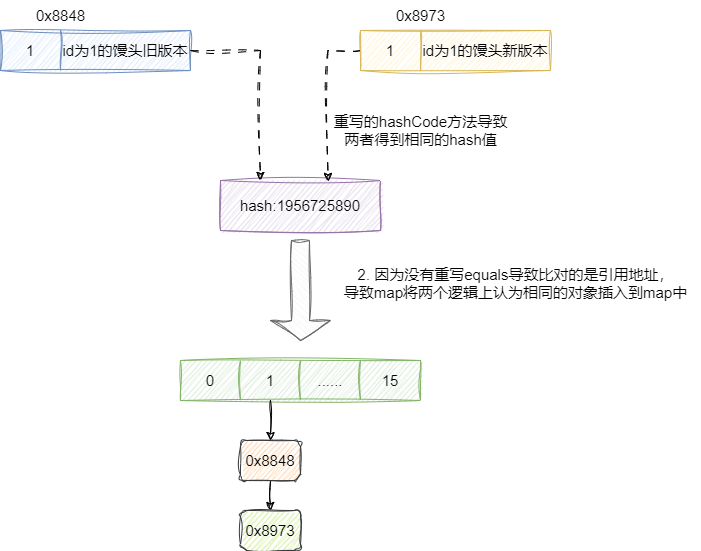
假设我们没有重写equals就会发现,因为上一步hash值一样,但是equals没有重写导致两个元素比较的是引用地址,因为引用地址的不同导致hashMap认定两者不为同一个key进而导致逻辑上认为相同的元素,却都插入到map中:
对此我们给出putVal的源码,读者可基于该说法进行代入性的调试:
final V putVal(int hash, K key, V value, boolean onlyIfAbsent,
                   boolean evict) {
      //......
        else {
            Node<K,V> e; K k;
			//如果hash相同且对象相等则走这段逻辑,设置一个值直接返回不进行插入操作
            if (p.hash == hash &&
                ((k = p.key) == key || (key != null && key.equals(k))))
                e = p;
		//否则进行插入操作
            else if (p instanceof TreeNode)
                e = ((TreeNode<K,V>)p).putTreeVal(this, tab, hash, key, value);
            else {
                for (int binCount = 0; ; ++binCount) {
                    if ((e = p.next) == null) {
                        p.next = newNode(hash, key, value, null);
                        if (binCount >= TREEIFY_THRESHOLD - 1) // -1 for 1st
                            treeifyBin(tab, hash);
                        break;
                    }

                    if (e.hash == hash &&
                        ((k = e.key) == key || (key != null && key.equals(k))))
                        break;
                    p = e;
                }
            }
       .......
    }
2
3
4
5
6
7
8
9
10
11
12
13
14
15
16
17
18
19
20
21
22
23
24
25
26
27
28
29
# HashMap 常见遍历以及安全删除代码要怎么做?
示例代码如下,读者可自行调试,大抵是建议使用entrySet,以及在循环时安全删除建议使用entrySet的迭代器形式:
private static HashMap<String, String> map = new HashMap();

    @Before
    public void before() {
        int size = 1000_0000;
        for (int i = 0; i < size; i++) {
            map.put(String.valueOf(i), String.valueOf(i));
        }
    }

    @Test
    public void CycleTest() {
        long start = System.currentTimeMillis();
        Iterator<Map.Entry<String, String>> iterator = map.entrySet().iterator();
        while (iterator.hasNext()) {
            Map.Entry<String, String> entry = iterator.next();
            String key = entry.getKey();
            String value = entry.getValue();
        }
        long end = System.currentTimeMillis();
        System.out.println("entry iterator遍历:" + (end - start));


        start = System.currentTimeMillis();
        Iterator<String> keySetIterator = map.keySet().iterator();
        while (keySetIterator.hasNext()) {
            String key = keySetIterator.next();
            String value = map.get(key);

        }
        end = System.currentTimeMillis();
        System.out.println("keySet Iterator遍历:" + (end - start));

        start = System.currentTimeMillis();
        for (Map.Entry<String, String> entry : map.entrySet()) {
            String key = entry.getKey();
            String value = entry.getValue();
        }
        end = System.currentTimeMillis();
        System.out.println("entrySet 遍历:" + (end - start));


        start = System.currentTimeMillis();
        for (String key : map.keySet()) {
            String resultKey = key;
            String value = map.get(key);
        }
        end = System.currentTimeMillis();
        System.out.println("foreach keyset 遍历:" + (end - start));


        start = System.currentTimeMillis();
        map.forEach((k, v) -> {
            String key = k;
            String value = v;
        });
        end = System.currentTimeMillis();
        System.out.println("lambda 遍历:" + (end - start));


        start = System.currentTimeMillis();
        map.entrySet().stream().forEach((entry)->{
            String key=entry.getKey();
            String value=entry.getValue();
        });
        end = System.currentTimeMillis();
        System.out.println("stream 遍历:" + (end - start));


        start = System.currentTimeMillis();
        map.entrySet().parallelStream().forEach((entry)->{
            String key=entry.getKey();
            String value=entry.getValue();
        });
        end = System.currentTimeMillis();
        System.out.println("并行流 遍历:" + (end - start));

        /**
         * 输出结果 entrySet性能最好
         * entry iterator遍历:228
         * keySet Iterator遍历:284
         * entrySet 遍历:228
         * foreach keyset 遍历:284
         * lambda 遍历:237
         * stream 遍历:230
         * 并行流 遍历:134
         */


        /**
         * 两个entry反编译的字节码一样说明时长一样
         * long start = System.currentTimeMillis();
         *
         *         Entry entry;
         *         String var6;
         *         for(Iterator iterator = map.entrySet().iterator(); iterator.hasNext(); var6 = (String)entry.getValue()) {
         *             entry = (Entry)iterator.next();
         *             String key = (String)entry.getKey();
         *         }
         *
         *         long end = System.currentTimeMillis();
         *         System.out.println("entry iterator遍历:" + (end - start));
         *
         *
         *          start = System.currentTimeMillis();
         *
         *         String var10;
         *         Iterator var13;
         *         Entry entry;
         *         for(var13 = map.entrySet().iterator(); var13.hasNext(); var10 = (String)entry.getValue()) {
         *             entry = (Entry)var13.next();
         *             String key = (String)entry.getKey();
         *         }
         *
         *         end = System.currentTimeMillis();
         *         System.out.println("entrySet 遍历:" + (end - start));
         */


        /**
         * 安全删除
         */
        Iterator<Map.Entry<String, String>> it = map.entrySet().iterator();
        while (it.hasNext()) {
            Map.Entry<String, String> entry = it.next();
            if (entry.getKey() .equals("1") ) {
                // 删除
                System.out.println("del:" + entry.getKey());
                iterator.remove();
            } else {
                System.out.println("show:" + entry.getKey());
            }
        }
    }
2
3
4
5
6
7
8
9
10
11
12
13
14
15
16
17
18
19
20
21
22
23
24
25
26
27
28
29
30
31
32
33
34
35
36
37
38
39
40
41
42
43
44
45
46
47
48
49
50
51
52
53
54
55
56
57
58
59
60
61
62
63
64
65
66
67
68
69
70
71
72
73
74
75
76
77
78
79
80
81
82
83
84
85
86
87
88
89
90
91
92
93
94
95
96
97
98
99
100
101
102
103
104
105
106
107
108
109
110
111
112
113
114
115
116
117
118
119
120
121
122
123
124
125
126
127
128
129
130
131
132
133
134
135
136
# HashMap多线程可能导致的问题
具体可以参考笔者这篇文章,大致原因是JDK7版本的HashMap在多线程扩容期间,一个线程指向迁移节点后被挂起,另一个线程完成扩容后。这个线程重新那会CPU执行权在执行原有的迁移逻辑,会造成死循环进而打爆CPU 100%问题,而JDK8则可能会导致同一个两个key计算到相同的hash值进而导致后put的元素将前一个元素覆盖。
更多可以参考笔者写的这篇文章:
Java并发容器小结:https://blog.csdn.net/shark_chili3007/article/details/122784001 (opens new window)
# 更多关于HashMap与红黑树的详解
具体可以参考笔者写的这篇文章:
如果读者想更加直观查看红黑树生成过程可以看看这个网站
Red/Black Tree Visualization:https://www.cs.usfca.edu/~galles/visualization/RedBlack.html (opens new window)
# 关于我
我是 sharkchili ,CSDN Java 领域博客专家,mini-redis的作者,我想写一些有意思的东西,希望对你有帮助,如果你想实时收到我写的硬核的文章也欢迎你关注我的公众号: 写代码的SharkChili 。
同时也非常欢迎你star我的开源项目mini-redis:https://github.com/shark-ctrl/mini-redis (opens new window)
因为近期收到很多读者的私信,所以也专门创建了一个交流群,感兴趣的读者可以通过上方的公众号获取笔者的联系方式完成好友添加,点击备注 “加群” 即可和笔者和笔者的朋友们进行深入交流。

# 参考文献
hashCode为什么使用31作为乘积数:https://bugstack.cn/md/java/interview/2020-08-04-面经手册 · 第2篇《数据结构,HashCode为什么使用31作为乘数?》.html (opens new window)
重写equals为什么要重写hashCode:https://www.modb.pro/db/49230 (opens new window)
HashMap源码&底层数据结构分析:https://javaguide.cn/java/collection/hashmap-source-code.html#hashmap-简介 (opens new window)
HashMap如何解决哈希冲突?:https://blog.csdn.net/ahuangqingfeng/article/details/124286368 (opens new window)
HashMap扩容大小为什么是2的幂:https://www.jianshu.com/p/5ddf1b664641 (opens new window)
